> ## Documentation Index
> Fetch the complete documentation index at: https://docs.levelblue.com/llms.txt
> Use this file to discover all available pages before exploring further.
# USM Anywhere and ConnectWise Manage UI Integration
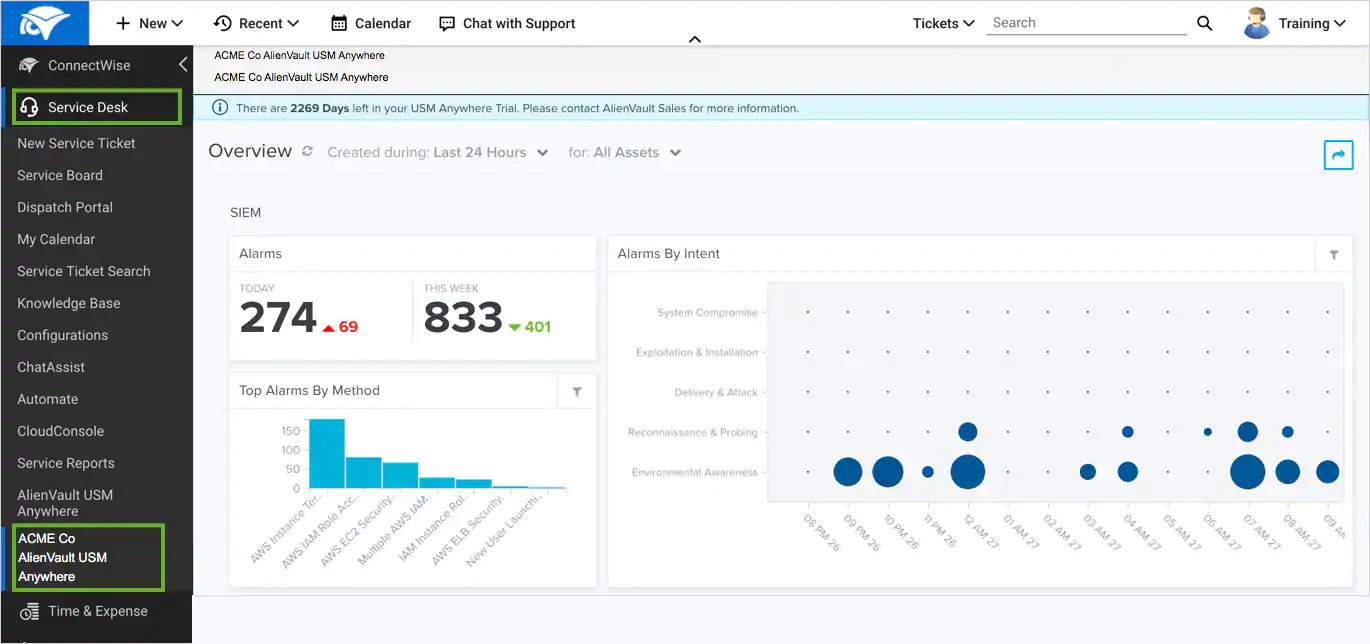
With a successful connection to your ConnectWise environment, the BlueApp for ConnectWise supports a user interface (UI) integration to launch the USM Anywhere console directly from the ConnectWise Manage UI. As a Managed Service Provider using ConnectWise Manage, you can easily launch each instance when you have more than one USM Anywhere instance deployed for your end customers.
**To access a USM Anywhere console from ConnectWise Manage**
1. In ConnectWise Manage, select **Service Desk** to expand the menu.
2. Scroll to the bottom of the Service Desk items and select the connected USM Anywhere instance.
3. Enter a username and password for the USM Anywhere instance and click **Login**.
The ConnectWise Manage UI loads the USM Anywhere console in the context page.
 To view other related training videos, [click here](https://cybersecurity.att.com/training/self-paced-training).