> ## Documentation Index
> Fetch the complete documentation index at: https://docs.levelblue.com/llms.txt
> Use this file to discover all available pages before exploring further.
# Collect AWS CloudTrail Logs on an AWS Sensor
Amazon Web Services (AWS) CloudTrail provides a complete audit log for all actions taken with the Amazon API, either through the web user interface (UI), the AWS Command Line Interface (CLI), or an AWS software development kit (SDK). Ongoing monitoring of this log gives you visibility of end user and automated actions in your environment. This helps you quickly detect abuse cases and security incidents, such as a user trying to make changes to an AWS account that are inconsistent with their privileges.
USM Anywhere automatically detects AWS CloudTrail and retrieves your AWS CloudTrail logs across all regions within a single AWS account. USM Anywhere also provides you the credentials to securely access your AWS CloudTrail logs. When a new trail is detected, a new log collection job is automatically created and enabled to capture the logs in that trail. Similarly, if a trail is deleted, the existing job that was created for it is automatically deleted.
As the AWS Sensor collects this raw log data, USM Anywhere uses its AWS CloudTrail data source to normalize the data and generate meaningful events. Depending on the size and activity in your AWS account, this log collection can produce an excessive number of events. See [Managing Collected CloudTrail Event Logs](../../user-guide/events/cloudtrail-events-rules) for a list of possible CloudTrail events. Similarly, if your AWS instance includes organizations, you may create a trail that will log all events for any AWS accounts assigned to an organization.
**Note:** If you choose not to enable AWS CloudTrail, USM Anywhere processes all stored logs at initial startup. See the [Amazon documentation](http://docs.aws.amazon.com/awscloudtrail/latest/userguide/cloudtrail-user-guide.html) for information about enabling AWS CloudTrail. After that initial processing, log collection jobs run every five minutes to ensure that logs are captured and can generate meaningful events in a timely manner.
**Note:** Sometimes you may see that the CloudTrail events in USM Anywhere display a different username compared to the raw log. This is because CloudTrail provides different types of user identities, one of which is *AssumedRole*. When the user identity type is set to AssumedRole, it means that the user credential is temporary and the username you see in the raw log is not the actual username. See [Amazon documentation](https://docs.aws.amazon.com/awscloudtrail/latest/userguide/cloudtrail-event-reference-user-identity.html) for more information.
**To enable AWS CloudTrail for your AWS Sensor**
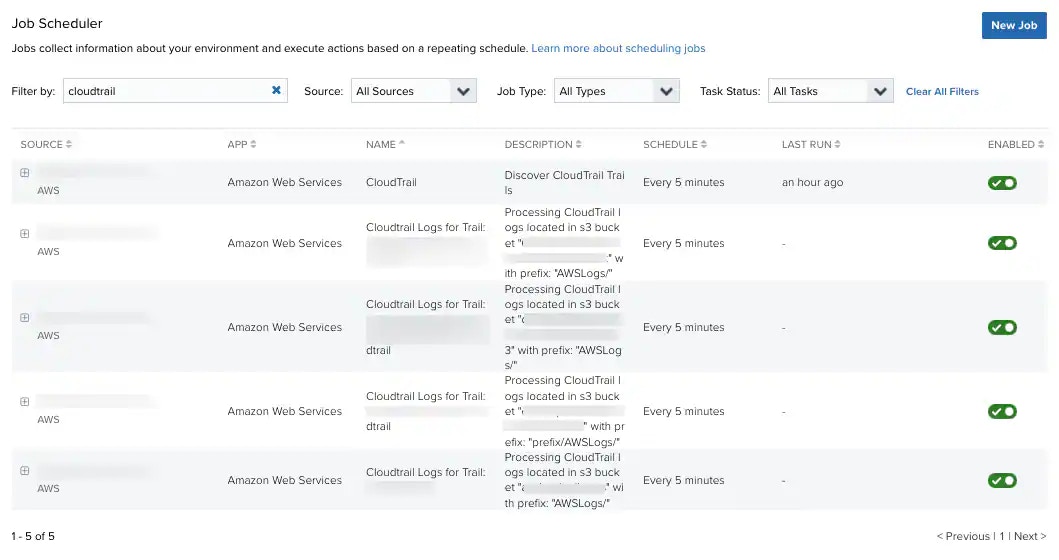
1. Go to **Settings > Scheduler**.
2. Search for **CloudTrail** in the Job Scheduler **Filter By** field.
3. In the row for the CloudTrail job, click the  icon to enable the AWS CloudTrail jobs.
This turns the
icon to enable the AWS CloudTrail jobs.
This turns the  icon green.
 The following video demonstrates how to configure AWS to capture CloudTrail logs and where USM Anywhere displays CloudTrail events:
 To view other related training videos, [click here](https://cybersecurity.att.com/training/self-paced-training).