> ## Documentation Index
> Fetch the complete documentation index at: https://docs.levelblue.com/llms.txt
> Use this file to discover all available pages before exploring further.

# Searching Assets

|                       |               |                  |             |             |
| --------------------- | ------------- | ---------------- | ----------- | ----------- |
| **Role Availability** | **Read-Only** | **Investigator** | **Analyst** | **Manager** |

USM Anywhere includes the option of searching items of interest on the page. There are several filters displayed by default. You can either filter your search or enter what you are looking for in the search field.

You can configure more filters and change which filters to display by clicking the **Configure Filters** link located in the upper-left side of the page. See [Managing Filters](/documentation/usm-anywhere/user-guide/asset-management/asset-administration/managing-filters) for more information.

The following table lists the filters you see on the page.

**Filters Displayed by Default in the Main Assets Page**

| Filter Name           | Meaning                                                                                                                                                                                                                                                                                                                                                                                                                                                                                               |
| --------------------- | ----------------------------------------------------------------------------------------------------------------------------------------------------------------------------------------------------------------------------------------------------------------------------------------------------------------------------------------------------------------------------------------------------------------------------------------------------------------------------------------------------- |
| **Advanced Search**   | Use this filter for searching a specific value of a field. See [Advanced Search Filter](/documentation/usm-anywhere/user-guide/asset-management/asset-administration/advanced-search-filter) for more information.                                                                                                                                                                                                                                                                                    |
| **Stats**             | Filter assets having <Tooltip tip="An IP-addressable host, including but not limited to network devices, virtual servers, and physical servers.">events</Tooltip>, <Tooltip tip="Alarms provide notification of an event or sequence of events that require attention or investigation.">alarms</Tooltip>, vulnerabilities, or <Tooltip tip="An identified configuration of deployed software or features of software that is in use, which is known to be insecure.">configuration issues</Tooltip>. |
| **Sensor**            | Filter assets by the associated USM Anywhere <Tooltip tip="Sensors are deployed into an on-premises, cloud, or multi-cloud environment to collect logs and other security-related data. This data is normalized and then securely forwarded to USM Anywhere for analysis and correlation.">sensor</Tooltip>.                                                                                                                                                                                          |
| **Asset Origin Type** | Filter assets by who added the asset to the system.                                                                                                                                                                                                                                                                                                                                                                                                                                                   |
| **Group Membership**  | Filter assets by the associated group.                                                                                                                                                                                                                                                                                                                                                                                                                                                                |
| **Instance Type**     | (Only for the Amazon Web Services \[AWS] Sensor). Filter assets by <Tooltip tip="Suite of cloud computing services from Amazon that make up an on-demand computing platform.">AWS</Tooltip> instance type.                                                                                                                                                                                                                                                                                            |
| **Region**            | (Only for the AWS Sensor). Filter assets by <Tooltip tip="Suite of cloud computing services from Amazon that make up an on-demand computing platform.">AWS</Tooltip> region.                                                                                                                                                                                                                                                                                                                          |
| **Operating System**  | Filter assets by <Tooltip tip="Software that manages computer hardware resources and provides common services for computer programs. Examples include Microsoft Windows, Macintosh OS X, UNIX, and Linux.">operating system</Tooltip> (OS).                                                                                                                                                                                                                                                           |
| **Asset Type**        | Filter assets by asset type. See [USM Accepted Asset Types](/documentation/usm-anywhere/user-guide/asset-management/asset-administration/editing-assets) for more information.                                                                                                                                                                                                                                                                                                                        |

The number between brackets displayed by each filter indicates the number of items that matches the filter.You can also use the filter controls to provide a method of organizing your search and filtered results.

The following table shows the icons displayed with each filter box.

**Icons Next to the Filter Title**

| Icon                                                                                                                                                                                                                                                                                                                                                                                                                                                                                                                                                                                                                                                                                                                                                                                                                                                                                                                                                                                                                                                                                                                                                                                                                                                                                                                                                                                                                                                                                                                                                                                                                                                                                                                                                                                                                                                                                                                                                                                                                                                                                                                                                                                                                                                                                                                                                                                                                                                                                                                                                                                                                                                                                                                                                                                                                                                                                                                                                                                                                                                                                                   | Meaning                                                |
| ------------------------------------------------------------------------------------------------------------------------------------------------------------------------------------------------------------------------------------------------------------------------------------------------------------------------------------------------------------------------------------------------------------------------------------------------------------------------------------------------------------------------------------------------------------------------------------------------------------------------------------------------------------------------------------------------------------------------------------------------------------------------------------------------------------------------------------------------------------------------------------------------------------------------------------------------------------------------------------------------------------------------------------------------------------------------------------------------------------------------------------------------------------------------------------------------------------------------------------------------------------------------------------------------------------------------------------------------------------------------------------------------------------------------------------------------------------------------------------------------------------------------------------------------------------------------------------------------------------------------------------------------------------------------------------------------------------------------------------------------------------------------------------------------------------------------------------------------------------------------------------------------------------------------------------------------------------------------------------------------------------------------------------------------------------------------------------------------------------------------------------------------------------------------------------------------------------------------------------------------------------------------------------------------------------------------------------------------------------------------------------------------------------------------------------------------------------------------------------------------------------------------------------------------------------------------------------------------------------------------------------------------------------------------------------------------------------------------------------------------------------------------------------------------------------------------------------------------------------------------------------------------------------------------------------------------------------------------------------------------------------------------------------------------------------------------------------------------------ | ------------------------------------------------------ |
| <img src="https://mintcdn.com/levelblue-5324744e/ZS7tUvuIZXE1ELcm/images/usm-central/sort-alpha-asc.svg?fit=max&auto=format&n=ZS7tUvuIZXE1ELcm&q=85&s=025721d6c786b5e0a319aa3eda923489" className="inline m-0" width="20" height="20" data-path="images/usm-central/sort-alpha-asc.svg" /><img src="https://mintcdn.com/levelblue-5324744e/ZS7tUvuIZXE1ELcm/images/usm-central/sort-alpha-desc.svg?fit=max&auto=format&n=ZS7tUvuIZXE1ELcm&q=85&s=49b14405f661faaa121a83671a0351c6" className="inline m-0" width="20" height="20" data-path="images/usm-central/sort-alpha-desc.svg" />                 | Sort the filters alphabetically.                       |
| <img src="https://mintcdn.com/levelblue-5324744e/ZS7tUvuIZXE1ELcm/images/usm-central/sort-amount-asc.svg?fit=max&auto=format&n=ZS7tUvuIZXE1ELcm&q=85&s=0501a1dccf044a7d470578b02fac7c9b" className="inline m-0" width="20" height="20" data-path="images/usm-central/sort-amount-asc.svg" /><img src="https://mintcdn.com/levelblue-5324744e/ZS7tUvuIZXE1ELcm/images/usm-central/sort-amount-desc.svg?fit=max&auto=format&n=ZS7tUvuIZXE1ELcm&q=85&s=4a6ca200ab5f312a0ebcc2b1410cc2ab" className="inline m-0" width="20" height="20" data-path="images/usm-central/sort-amount-desc.svg" /> | Sort the filters by number of items that matches them. |

***

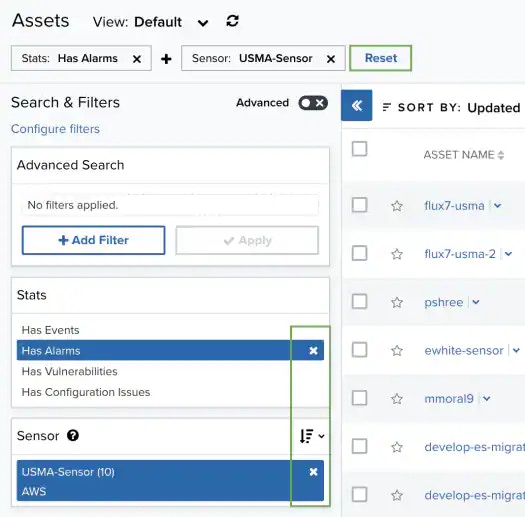
In the upper-left side of the page, you can see any filters you have applied.\
Remove filters by clicking the <img src="https://mintcdn.com/levelblue-5324744e/yWllrh2N4cA-lI7S/images/usm-central/close-thin.svg?fit=max&auto=format&n=yWllrh2N4cA-lI7S&q=85&s=0242f47b31c5eb242750f14061fca2b9" className="inline m-0" width="24" height="24" data-path="images/usm-central/close-thin.svg" /> icon next to the filter. Or clear all filters by clicking **Reset**.
<Frame>
  <img src="https://mintcdn.com/levelblue-5324744e/-bY1Wo2ZbXoIM88S/images/usm-anywhere/user-guide/assetresetfilters_525x517.webp?fit=max&auto=format&n=-bY1Wo2ZbXoIM88S&q=85&s=8f203ddc75873a54f1ebb6f66553a273" alt="" width="525" height="517" data-path="images/usm-anywhere/user-guide/assetresetfilters_525x517.webp" />
</Frame>

<Note>
  **Note:** When applying filters, the search uses the logical AND operator if
  the used filters are different. However, when the filter is of the same type,
  the search uses the logical OR operator.
</Note>

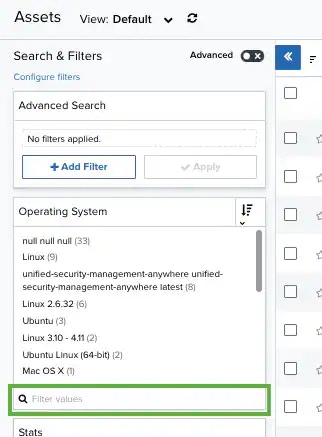
Those filters that have more than 10 options include a Filter Values search field for writing text and making the search easier. If there are more than 50 search results, a icon appears to the right of the **Filter Values** search field. Click this icon to download a CSV containing up to 1024 results.
<Frame>
  <img src="https://mintcdn.com/levelblue-5324744e/IHlmYs9Cu_2Aq2A4/images/usm-anywhere/user-guide/filtervaluesearchfield.webp?fit=max&auto=format&n=IHlmYs9Cu_2Aq2A4&q=85&s=10d17ca38885a22b1ecb2567572cfc4b" alt="" width="322" height="437" data-path="images/usm-anywhere/user-guide/filtervaluesearchfield.webp" />
</Frame>
