> ## Documentation Index
> Fetch the complete documentation index at: https://docs.levelblue.com/llms.txt
> Use this file to discover all available pages before exploring further.
# Data Source Rules Management
| | | | | |
| --------------------- | --------- | ------------ | ----------- | ----------- |
| **Role Availability** | Read-Only | Investigator | **Analyst** | **Manager** |
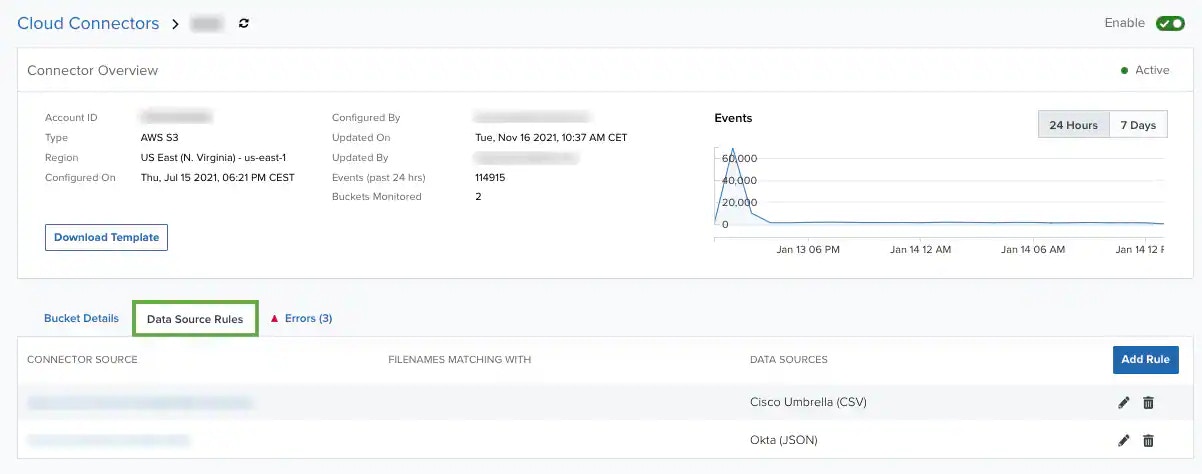
USM Anywhere enables you to manage rules for files stored in your Amazon Simple Storage Service (S3) bucket. Using a rule, USM Anywhere can match a file with a specific data source and generate the related events. If the file doesn't match with a data source, then USM Anywhere will create an event as an AlienVault Generic Data Source. See [LevelBlue Generic Data Source](https://cybersecurity.att.com/documentation/usm-anywhere/user-guide/events/av-generic-plugin) for more information.
**To open the Data Source Rules tab**
1. Go to **Data Sources > Cloud Connectors** to open the Cloud Connectors main page.
2. Click the  icon of the Cloud Connector for which you want to open the data source rules tab, and then select **View Connector**.
3. Click the **Data Source Rules** tab.
icon of the Cloud Connector for which you want to open the data source rules tab, and then select **View Connector**.
3. Click the **Data Source Rules** tab.
 This topic discusses these subtopics:
[Adding a Data Source Rule](/documentation/usm-anywhere/user-guide/cloud-connector/aws/adding-data-source-rules)
[Editing a Data Source Rule](/documentation/usm-anywhere/user-guide/cloud-connector/aws/editing-data-source-rules)
[Deleting Data Source Rules](/documentation/usm-anywhere/user-guide/cloud-connector/aws/deleting-data-source-rules)
This topic discusses these subtopics:
[Adding a Data Source Rule](/documentation/usm-anywhere/user-guide/cloud-connector/aws/adding-data-source-rules)
[Editing a Data Source Rule](/documentation/usm-anywhere/user-guide/cloud-connector/aws/editing-data-source-rules)
[Deleting Data Source Rules](/documentation/usm-anywhere/user-guide/cloud-connector/aws/deleting-data-source-rules)