> ## Documentation Index
> Fetch the complete documentation index at: https://docs.levelblue.com/llms.txt
> Use this file to discover all available pages before exploring further.
# Amazon DynamoDB Dashboard
| | | | | |
| --------------------- | ------------- | ---------------- | ----------- | ----------- |
| **Role Availability** | **Read-Only** | **Investigator** | **Analyst** | **Manager** |
Depending on the USM Anywhere Sensor you have installed, the widgets might be visible in the Amazon DynamoDB dashboard. This dashboard displays data when the Amazon Web Services (AWS) CloudTraildata source has been configured and includes Amazon DynamoDB events.
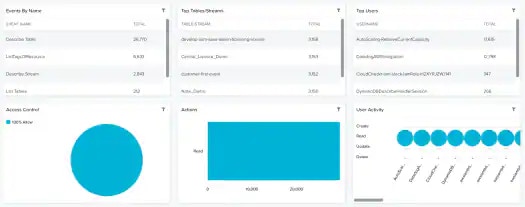 **Widgets in the DynamoDB Dashboard**
| **Widget** | **Description** |
| ------------------ | ---------------------------------------------------------------------------------------------------------------------------------------------------------------------------------------------------------------------------------------- |
| Events By Name | List of events by name. |
| Access Control | Pie chart displaying, in percentages, the authentication and access control for DynamoDB. |
| Top Tables/Streams | List of the top DynamoDB streams. |
| Actions | List of actions supported by Amazon DynamoDB. |
| Top Users | List of the Amazon DynamoDB top users. |
| User Activity | Users related to their implied activity, which can be create, read, update and delete (CRUD). The size of the bubbles depends on the number of issues. |
**Widgets in the DynamoDB Dashboard**
| **Widget** | **Description** |
| ------------------ | ---------------------------------------------------------------------------------------------------------------------------------------------------------------------------------------------------------------------------------------- |
| Events By Name | List of events by name. |
| Access Control | Pie chart displaying, in percentages, the authentication and access control for DynamoDB. |
| Top Tables/Streams | List of the top DynamoDB streams. |
| Actions | List of actions supported by Amazon DynamoDB. |
| Top Users | List of the Amazon DynamoDB top users. |
| User Activity | Users related to their implied activity, which can be create, read, update and delete (CRUD). The size of the bubbles depends on the number of issues. |