> ## Documentation Index
> Fetch the complete documentation index at: https://docs.levelblue.com/llms.txt
> Use this file to discover all available pages before exploring further.
# Google G Suite Drive Dashboard
| | | | | |
| --------------------- | ------------- | ---------------- | ----------- | ----------- |
| **Role Availability** | **Read-Only** | **Investigator** | **Analyst** | **Manager** |
Depending on the USM Anywhere Sensor you have installed, the widgets might be visible in the Google G Suite Drive dashboard. This dashboard displays data when the G Suite Drive data source has been configured. See [BlueApp for G Suite](documentation/usm-anywhere/alienapps-guide/g-suite/alienapp-g-suite.htm) for more information.
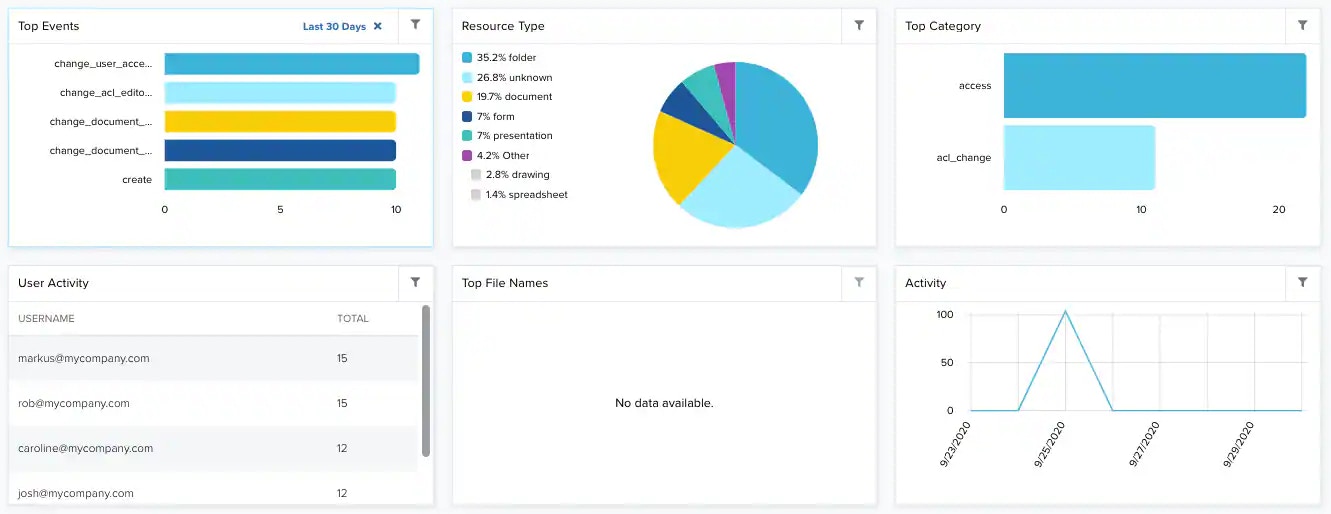 **Widgets in the Google G Suite Audit Dashboard**
| **Widget** | **Description** |
| -------------- | ----------------------------------------------------------------------------------- |
| Top Events | List of top events detected by Google G Suite Audit. |
| Resource Type | Pie chart displaying, in percentages, the type of resource in Google G Suite Audit. |
| Top Category | List of the top Google G Suite Audit category. |
| User Activity | List of the 5 users that have more activity in Google G Suite Audit. |
| Top File Names | List of the top 5 file names in Google G Suite Audit. |
| Activity | Graph that displays the activity in Google G Suite Audit by periods of time. |
**Widgets in the Google G Suite Audit Dashboard**
| **Widget** | **Description** |
| -------------- | ----------------------------------------------------------------------------------- |
| Top Events | List of top events detected by Google G Suite Audit. |
| Resource Type | Pie chart displaying, in percentages, the type of resource in Google G Suite Audit. |
| Top Category | List of the top Google G Suite Audit category. |
| User Activity | List of the 5 users that have more activity in Google G Suite Audit. |
| Top File Names | List of the top 5 file names in Google G Suite Audit. |
| Activity | Graph that displays the activity in Google G Suite Audit by periods of time. |