> ## Documentation Index
> Fetch the complete documentation index at: https://docs.levelblue.com/llms.txt
> Use this file to discover all available pages before exploring further.
# Overview Dashboard
| | | | | |
| --------------------- | ------------- | ---------------- | ----------- | ----------- |
| **Role Availability** | **Read-Only** | **Investigator** | **Analyst** | **Manager** |
This dashboard includes three separate sections.
## SIEM Section
**SIEM** security intelligence combines and correlates collected logs and other data to find malicious patterns in network traffic and within host activity.
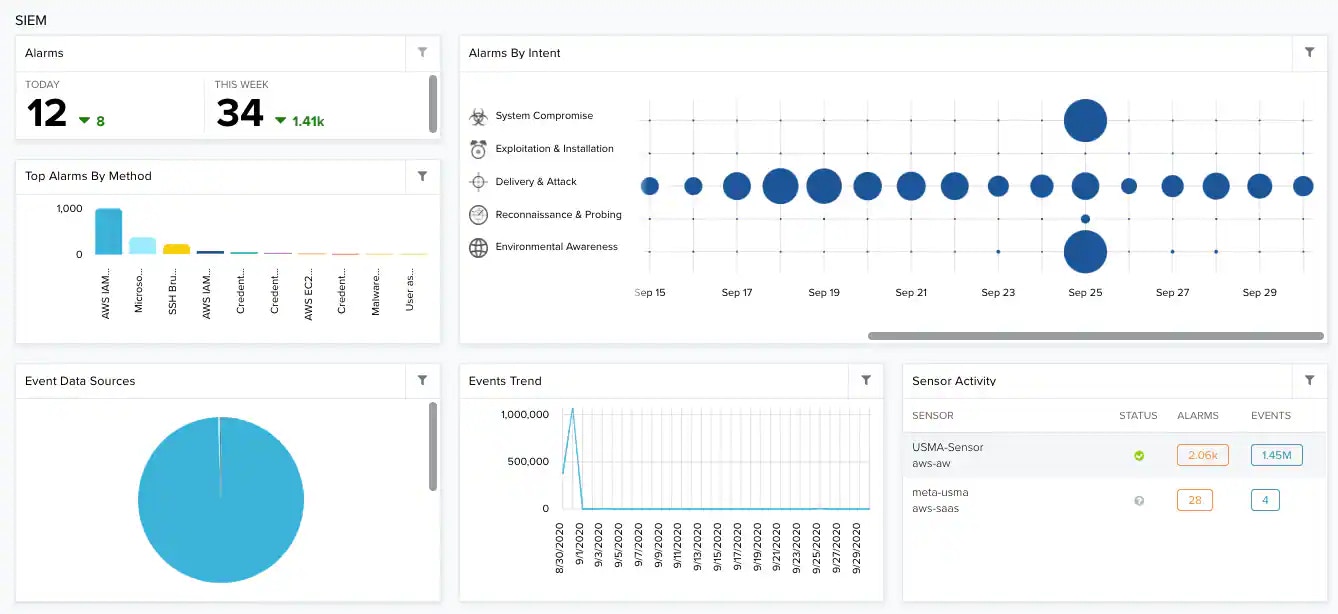 **Widgets in the SIEM Section1**
| **Widget** | **Description** |
| -------------------------------------------------------------------------------------------------------------------------------------- | ------------------------------------------------------------------------------------------------------------------------------------------------------------------------------------------------------------------------------------------------------------------------------------------------- |
| Alarms | Total number of alarms for the current day and for the current week. |
| Alarms by Intent | Alarms correlated by intent and related to a range of dates. The size of the bubbles depends on the number of issues. |
| Top Alarms by Method | List of the top 5 alarms ordered by the method of attack or infiltration and including the total number of alarms. |
| Event Data Sources | Most seen data sources to normalize events. |
| Events Trend | Graph that displays the trend in events. |
| Sensor Activity | Top sensor activity by events and alarms. |
## Asset Discovery Section
**Asset** Discovery discovers assets in your environment, detects changes in assets, and discovers malicious assets in the network.
**Widgets in the SIEM Section1**
| **Widget** | **Description** |
| -------------------------------------------------------------------------------------------------------------------------------------- | ------------------------------------------------------------------------------------------------------------------------------------------------------------------------------------------------------------------------------------------------------------------------------------------------- |
| Alarms | Total number of alarms for the current day and for the current week. |
| Alarms by Intent | Alarms correlated by intent and related to a range of dates. The size of the bubbles depends on the number of issues. |
| Top Alarms by Method | List of the top 5 alarms ordered by the method of attack or infiltration and including the total number of alarms. |
| Event Data Sources | Most seen data sources to normalize events. |
| Events Trend | Graph that displays the trend in events. |
| Sensor Activity | Top sensor activity by events and alarms. |
## Asset Discovery Section
**Asset** Discovery discovers assets in your environment, detects changes in assets, and discovers malicious assets in the network.
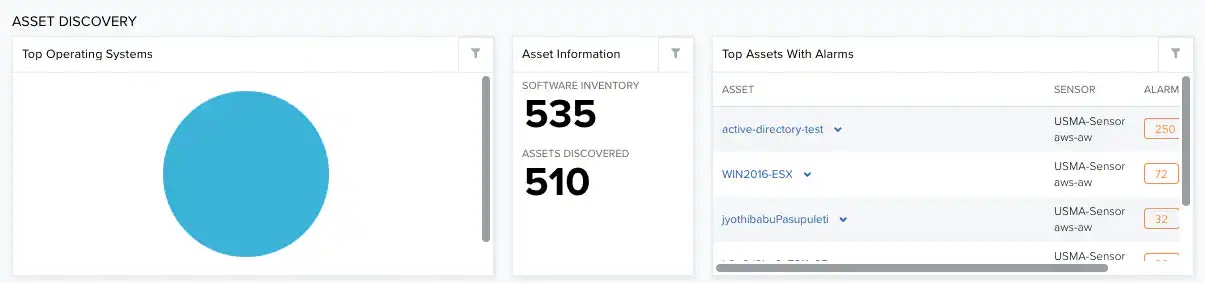 **Widgets in the Asset Discovery Section**
| **Widget** | **Description** |
| ---------------------- | ------------------------------------------------------------------------------------------------------------------------------------------------------------------------------------------------------------------------------------------------ |
| Top Operating Systems | List of the top operating systems on assets. |
| Asset Information | Software Inventory refers to the total number of assets having software installed.
**Widgets in the Asset Discovery Section**
| **Widget** | **Description** |
| ---------------------- | ------------------------------------------------------------------------------------------------------------------------------------------------------------------------------------------------------------------------------------------------ |
| Top Operating Systems | List of the top operating systems on assets. |
| Asset Information | Software Inventory refers to the total number of assets having software installed.
Assets Discovered refers to the total number of assets discovered by the user. |
| Top Assets with Alarms | List of the top 5 assets having the most alarms. |
## Vulnerability Assessment Section
**Vulnerability Assessment** identify vulnerabilities or compliance by comparing the installed software on assets with a database of known vulnerabilities.
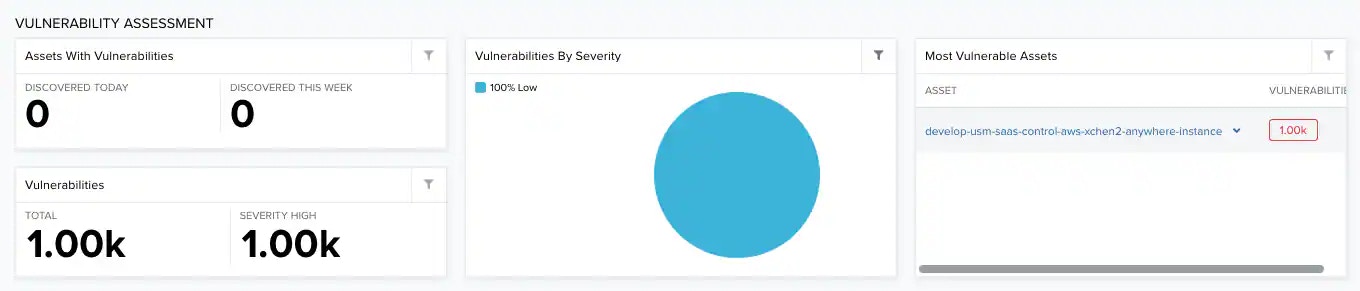 **Widgets in the Vulnerability Assessment Section**
| **Widget** | **Description** |
| --------------------------- | ------------------------------------------------------------------------------------------- |
| Assets with Vulnerabilities | Total number of assets having vulnerabilities for the current day and for the current week. |
| Vulnerabilities | Total number of vulnerabilities in your environment. |
| Vulnerabilities by Severity | Top vulnerabilities ordered by severity. See About Vulnerability Severity. |
| Most Vulnerable Assets | List of most vulnerable assets. |
**Widgets in the Vulnerability Assessment Section**
| **Widget** | **Description** |
| --------------------------- | ------------------------------------------------------------------------------------------- |
| Assets with Vulnerabilities | Total number of assets having vulnerabilities for the current day and for the current week. |
| Vulnerabilities | Total number of vulnerabilities in your environment. |
| Vulnerabilities by Severity | Top vulnerabilities ordered by severity. See About Vulnerability Severity. |
| Most Vulnerable Assets | List of most vulnerable assets. |