> ## Documentation Index
> Fetch the complete documentation index at: https://docs.levelblue.com/llms.txt
> Use this file to discover all available pages before exploring further.
# Investigations List View
| | | | | |
| --------------------- | ------------- | ---------------- | ----------- | ----------- |
| **Role Availability** | **Read-Only** | **Investigator** | **Analyst** | **Manager** |
The Investigations page provides a list of all of the investigations created in your environment. Go to **Investigations** to open a centralized view of your investigations. Each row details an investigation.
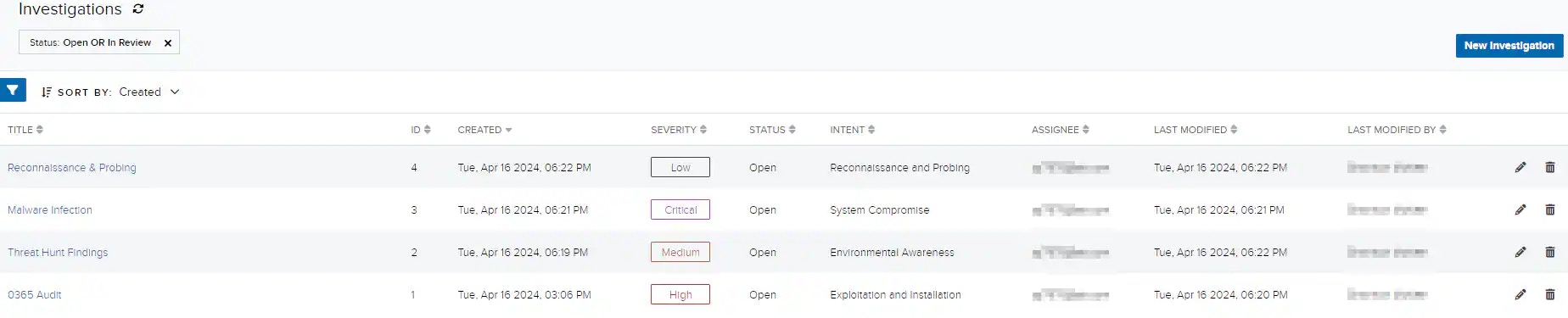 The Investigations page includes navigation and filtering elements to help you locate the investigations you want to review. When you go to **Investigations**, the page displays all of the open and in-review items by default.
The following table lists the default columns on the Investigations page.
**Default Columns on the Investigations Page**
| Column / Field Name | Description |
| ------------------- | --------------------------------------------------------------------------------------------------------------------------------------------------------------------------------------------------------------------------------------------------------------------- |
| Title | Name identifying the investigation. |
| ID | Sequential and automatic number assigned by the system that identifies the investigation. |
| Created | Date and time the investigation was created. The date displayed depends on your computer's time zone. |
| Severity | Severity of the investigation. Values are Low, Medium, High, and Critical. |
| Status | Status applied to the investigation. It can be Open, In Review, and Closed. See [Viewing Investigations Details](/documentation/usm-anywhere/user-guide/investigations/viewing-investigations-details) for more information. |
| Intent | Classify your investigation as Delivery & Attack, Environmental Awareness, Exploitation & Installation, Reconnaissance & Probing, or System Compromise. See [Intent](/documentation/usm-anywhere/user-guide/rules-management/correlation-rules) for more information. |
| Assignee | Email address of the person assigned to the investigation. |
| Last Modified | Date and time that the investigation was last modified. The time and date displayed depends on your computer's time zone. |
| Last Modified by | Email of the last person who modified the investigation. |
| Rating | Threat rating of the investigation. It can be Credible, Not Credible, or Undetermined. See [Viewing Investigations Details](/documentation/usm-anywhere/user-guide/investigations/viewing-investigations-details) if you want to change the status. |
Click the
The Investigations page includes navigation and filtering elements to help you locate the investigations you want to review. When you go to **Investigations**, the page displays all of the open and in-review items by default.
The following table lists the default columns on the Investigations page.
**Default Columns on the Investigations Page**
| Column / Field Name | Description |
| ------------------- | --------------------------------------------------------------------------------------------------------------------------------------------------------------------------------------------------------------------------------------------------------------------- |
| Title | Name identifying the investigation. |
| ID | Sequential and automatic number assigned by the system that identifies the investigation. |
| Created | Date and time the investigation was created. The date displayed depends on your computer's time zone. |
| Severity | Severity of the investigation. Values are Low, Medium, High, and Critical. |
| Status | Status applied to the investigation. It can be Open, In Review, and Closed. See [Viewing Investigations Details](/documentation/usm-anywhere/user-guide/investigations/viewing-investigations-details) for more information. |
| Intent | Classify your investigation as Delivery & Attack, Environmental Awareness, Exploitation & Installation, Reconnaissance & Probing, or System Compromise. See [Intent](/documentation/usm-anywhere/user-guide/rules-management/correlation-rules) for more information. |
| Assignee | Email address of the person assigned to the investigation. |
| Last Modified | Date and time that the investigation was last modified. The time and date displayed depends on your computer's time zone. |
| Last Modified by | Email of the last person who modified the investigation. |
| Rating | Threat rating of the investigation. It can be Credible, Not Credible, or Undetermined. See [Viewing Investigations Details](/documentation/usm-anywhere/user-guide/investigations/viewing-investigations-details) if you want to change the status. |
Click the  icon to modify an investigation. See [Editing Investigations](/documentation/usm-anywhere/user-guide/investigations/editing-investigations) for more information.
Click the
icon to modify an investigation. See [Editing Investigations](/documentation/usm-anywhere/user-guide/investigations/editing-investigations) for more information.
Click the  icon to delete an investigation. See [Deleting Investigations](/documentation/usm-anywhere/user-guide/investigations/deleting-investigations) for more information.