> ## Documentation Index
> Fetch the complete documentation index at: https://docs.levelblue.com/llms.txt
> Use this file to discover all available pages before exploring further.
# Deleting a Sensor
| | | | | |
| --------------------- | --------- | ---------------- | ------- | ----------- |
| **Role Availability** | Read-Only | **Investigator** | Analyst | **Manager** |
USM Anywhere enables you to delete completely a sensor from your environment. Keep in mind that if you delete a sensor, you will delete all assets and jobs related to that sensor.
**To delete a sensor**
1. Go to **Data Sources > Sensors** to open the page.
2. Click the  icon of the sensor you want to delete.
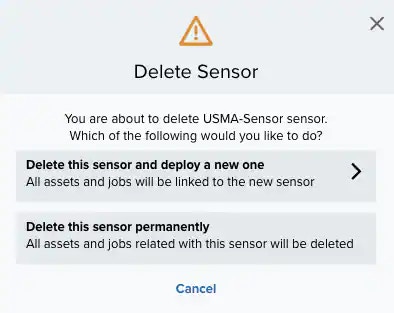 3. Click **Delete this sensor permanently.**
The deleted sensor is not displayed in the list of sensors.
**Important:** Keep in mind that if you terminate an AWS instance, an Azure virtual machine, GCP virtual machine, or a VMware virtual machine, any assets that have vulnerabilities associated with them will not be automatically deleted when the discovery scan finds them terminated in AWS, Azure, or VMware vCenter/vSphere.
3. Click **Delete this sensor permanently.**
The deleted sensor is not displayed in the list of sensors.
**Important:** Keep in mind that if you terminate an AWS instance, an Azure virtual machine, GCP virtual machine, or a VMware virtual machine, any assets that have vulnerabilities associated with them will not be automatically deleted when the discovery scan finds them terminated in AWS, Azure, or VMware vCenter/vSphere.