> ## Documentation Index
> Fetch the complete documentation index at: https://docs.levelblue.com/llms.txt
> Use this file to discover all available pages before exploring further.
# Disconnecting a USM Anywhere from a USM Central
| | | | | |
| --------------------- | --------- | ------------ | ------- | ----------- |
| **Role Availability** | Read-Only | Investigator | Analyst | **Manager** |
**To disconnect a USM Anywhere from a USM Central**
1. Go to **Settings > My Subscription**.
2. Go to the License Information section and click **Configure MSSP Service**.
The Connection to USM Central dialog box opens.
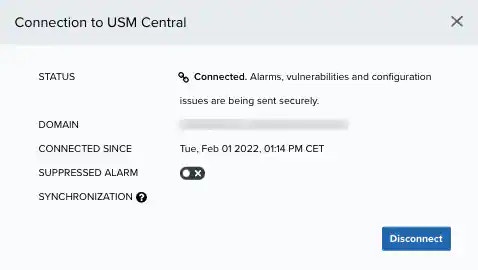 3. Click **Disconnect**.
The Disconnect Deployment dialog box opens.
3. Click **Disconnect**.
The Disconnect Deployment dialog box opens.
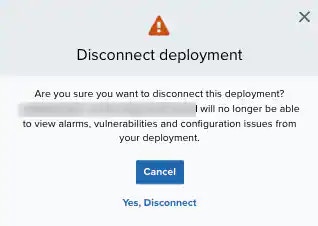 My Subscription Main Window, disconnect deployment
4. Click **Yes, Disconnect**.
My Subscription Main Window, disconnect deployment
4. Click **Yes, Disconnect**.