> ## Documentation Index
> Fetch the complete documentation index at: https://docs.levelblue.com/llms.txt
> Use this file to discover all available pages before exploring further.
# Subscription Management
| | | | | |
| --------------------- | ------------- | ---------------- | ----------- | ----------- |
| **Role Availability** | **Read-Only** | **Investigator** | **Analyst** | **Manager** |
With a USM Anywhere license, you can always view your subscription data in one place. Use the **My Subscription** page to access your license information, event data, and raw log data; as well as connect to a USM Central instance.
## Subscription Data
Go to **Settings > My Subscription** to open the page.
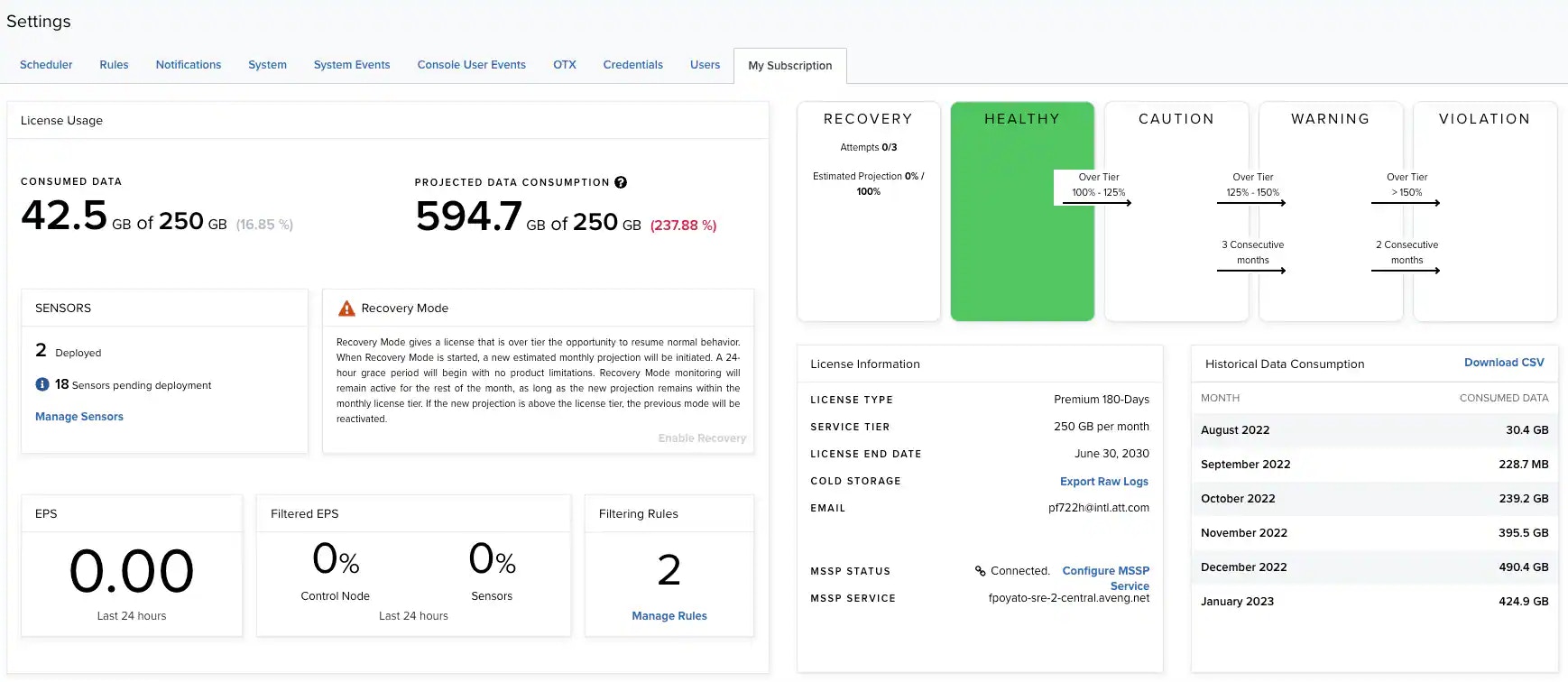 The table below lists the fields you see on the page.
**Information on the My Subscription page**
| Field | Description |
| -------------------------- | ------------------------------------------------------------------------------------------------------------------------------------------------------------------------------------------------------------------------------------------------------------------ |
| Consumed Data | The amount of data that USM Anywhere has processed every month |
| Projected Data Consumption | The amount of data already stored for the month plus calculated data storage needs for the rest of the month. See [Projected Data Consumption](/documentation/usm-anywhere/user-guide/subscription-management/projected-data-consumption) for more information. |
| Sensors | The number of licensed sensors and pending deployment sensors. Click **Manage Sensors** to open the **Sensors** page. See [Sensors Page Overview](/documentation/usm-anywhere/user-guide/sensor-management/sensors-navigation) for more information. |
| EPS | Events per second in the last 24 hours |
| Filtered EPS | Percentage of filtered EPS in the last 24 hours |
| Filtering Rules | Number of filtering rules in your environment. Click **Manage Rules** to open the **Filtering Rules** page. See [Filtering Rules from the Orchestration Rules Page](/documentation/usm-anywhere/user-guide/rules-management/filtering-rules) for more information. |
| Field | Description |
| ----------------------- | ------------------------------------------------------------------------------------------------------------------------------------------------------------------------------------------------------------------------------------------------------------------------------------------------------------------------------------------------------------- |
| Data Consumption Status | The health status of your subscription's data consumption, reflecting real data consumption rates compared to your subscription tier over time: healthy, caution, warning, violation, or recovery. See [Understanding Your Data Consumption Status](/documentation/usm-anywhere/user-guide/subscription-management/subscription-status) for more information. |
| Field | Description |
| --------------------------- | ---------------------------------------------------------------------------------------------------------------------------------------------------------------------------------------------------------------------------------------------------------------------------------------------------------------------------------------------------------------------------------------------------------------------------------------------------------------------------------------------------------------------------------------------------------------------------------------------------------------------------------------------------------------------------------------------------------------------------------------------------------------------------------------------------------------------------------------------- |
| License Type | Refers to either the trial or subscription license |
| Service Tier | Refers to the monthly storage limit. See the LevelBlue pricing page for details or to request a quote.
The table below lists the fields you see on the page.
**Information on the My Subscription page**
| Field | Description |
| -------------------------- | ------------------------------------------------------------------------------------------------------------------------------------------------------------------------------------------------------------------------------------------------------------------ |
| Consumed Data | The amount of data that USM Anywhere has processed every month |
| Projected Data Consumption | The amount of data already stored for the month plus calculated data storage needs for the rest of the month. See [Projected Data Consumption](/documentation/usm-anywhere/user-guide/subscription-management/projected-data-consumption) for more information. |
| Sensors | The number of licensed sensors and pending deployment sensors. Click **Manage Sensors** to open the **Sensors** page. See [Sensors Page Overview](/documentation/usm-anywhere/user-guide/sensor-management/sensors-navigation) for more information. |
| EPS | Events per second in the last 24 hours |
| Filtered EPS | Percentage of filtered EPS in the last 24 hours |
| Filtering Rules | Number of filtering rules in your environment. Click **Manage Rules** to open the **Filtering Rules** page. See [Filtering Rules from the Orchestration Rules Page](/documentation/usm-anywhere/user-guide/rules-management/filtering-rules) for more information. |
| Field | Description |
| ----------------------- | ------------------------------------------------------------------------------------------------------------------------------------------------------------------------------------------------------------------------------------------------------------------------------------------------------------------------------------------------------------- |
| Data Consumption Status | The health status of your subscription's data consumption, reflecting real data consumption rates compared to your subscription tier over time: healthy, caution, warning, violation, or recovery. See [Understanding Your Data Consumption Status](/documentation/usm-anywhere/user-guide/subscription-management/subscription-status) for more information. |
| Field | Description |
| --------------------------- | ---------------------------------------------------------------------------------------------------------------------------------------------------------------------------------------------------------------------------------------------------------------------------------------------------------------------------------------------------------------------------------------------------------------------------------------------------------------------------------------------------------------------------------------------------------------------------------------------------------------------------------------------------------------------------------------------------------------------------------------------------------------------------------------------------------------------------------------------- |
| License Type | Refers to either the trial or subscription license |
| Service Tier | Refers to the monthly storage limit. See the LevelBlue pricing page for details or to request a quote.
***Important***: Tier options do not have unlimited processing power, memory allotment, or disk input/output (I/O) speeds. In addition to storage per month, your deployment size's impact on any of these factors will influence which tier option is right for your environment. LevelBlue recommends pre-deployment sizing discussions with your sales representative to help select the right tier for you. |
| License End Date | Refers to either the trial expiration date (for trial licenses) or support end date (for subscription licenses). The displayed date depends on your computer's time zone. |
| Cold Storage | Click **Manage Raw Logs** to download the raw log files in zip format. See [Raw Log Data](/documentation/usm-anywhere/user-guide/subscription-management/my-subscription) for more information.
By default, cold storage is unlimited for USM Anywhere customers within their service terms; but limited for LevelBlue Threat Detection and Response for Government (LevelBlue TDR for Gov) customers for three years.
Remember the following:
- You can export raw logs for a 31-day month. However, you are limited to a 31-day span if the range exceeds a single month.
- The start time is 00:00:00 on the selected start date, and the end time is 23:59:59 on the selected end date. Example: If you select 1/1/2020 to 2/1/2020, the logs start at 00:00:00 1/1/2020 and end at 23:59:59 2/1/2020. |
| Email | Refers to the email address associated with your license. |
| MSSP Status | Indicates whether the USM Anywhere deployment has been successfully connected to a USM Central or not. See [Connecting a USM Anywhere to a USM Central](/documentation/usm-anywhere/user-guide/subscription-management/connection-usm-central) for more information. |
| MSSP Service | Name of the connected USM Central deployment |
| Historical Data Consumption | Refers to a list of data consumption by month. Click **Download CSV** to download a file with this information. |
| Top Data Sources | Displays a list of the top data sources. Click **Download CSV** to download a file with this information. |
| Top Event Names | List of the top event names related to their data source. Click **Download CSV** to download a file with this information. |
| Top Reporting Devices | List of top reporting devices. Click **Download CSV** to download a file with this information. |
## Raw Log Data
Raw log data is data that has been forwarded and collected through your sensors, agents, and Cloud Connectors. USM Anywhere stores this data and enables you to extract raw log data for audit purposes or further forensic analysis.
LevelBlue recommends that you download the raw log data on a monthly basis.
When requesting raw log files, the date range cannot exceed 31 days. To download more than 31 days' worth of data, you must make multiple requests. Refrain from making all requests at the same time, which may tie up your USM Anywhere instance. You can make two or three requests, wait for the emails to arrive, and then make your next requests.
**To request and extract raw log data**
1. Go to **Settings > My Subscription.**
2. Click **Manage Raw Logs** in the **License Information** section.
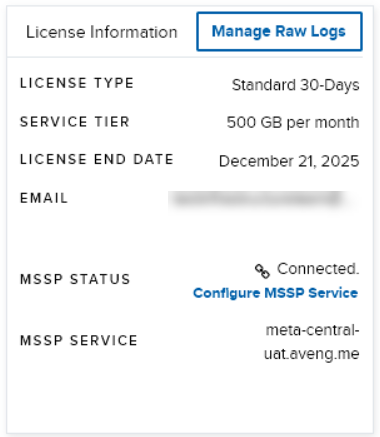 The **Manage Cold Storage Raw Logs** dialog box opens.
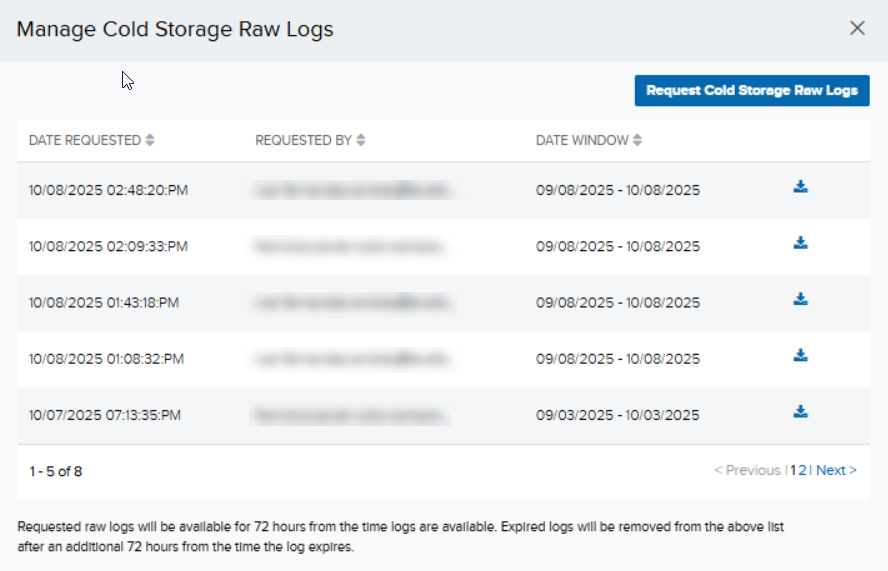 3. Click **Request Cold Storage Raw Logs**.
You may also download any of the previously requested cold storage raw logs, if any. Simply click the download icon.
4. Click the dropdown to select a date range to download the raw log files (dates are in UTC). Once you have set the date, click **Apply**.
3. Click **Request Cold Storage Raw Logs**.
You may also download any of the previously requested cold storage raw logs, if any. Simply click the download icon.
4. Click the dropdown to select a date range to download the raw log files (dates are in UTC). Once you have set the date, click **Apply**.
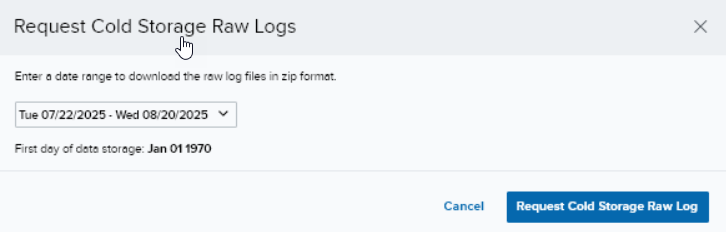 The start date cannot be earlier than your first day of storage. Furthermore, the date range cannot exceed 31 days.
5. Click **Request Cold Storage Raw Log**. A message will be displayed indicating that a new request has been triggered, and the request will be displayed among the list of requests made.
As the user who requested the raw logs, you will be sent an email to download the logs.
In the **Manage Cold Storage Raw Logs** dialog box, you can see your (latest) request at the top of the list with a **Processing** status. This changes to a download icon once it is ready for downloading.
/
6. Click the link in the email to navigate to the **Raw Logs Management** page. Your list of log requests (as well as those of the other users if you are logged in as a Manager) is displayed.
You need to be logged into USM Anywhere prior to clicking the link in your email. If you are not logged in, you will be prompted to log into the portal to navigate to the **Raw Logs Management** page.
7. Click the download icon to download the log files. Select the path in which to save the logs, and the download process starts.
8. Extract the zipped bundle, and you will see the files listed as `forensics-YYYY-MM-DD.hh.log.gz`, where *YYYY-MM-DD.hh* refers to the date and hour.
Requested raw logs are only available for **72 hours** from the time the logs are available. Any expired log will be removed from the list after an additional 72 hours from the time it expires. Should you click on the link after it has expired, you will be prompted to make a new request for the raw log.
You are able to access, request, and download cold storage raw logs as long as your license is valid. When your license expires, you will lose access to USM Anywhere, including your data in it. You have a 14-day grace period to renew your subscription; during which time your raw logs are kept by LevelBlue although no data will be collected until your license is renewed.
## Email Notifications Concerning Your License
USM Anywhere sends the following notification emails to the email address associated with your license. Typically, this is the email address used to register the trial or your subscription:
* A license is changed from trial to subscription.
* A license tier is upgraded.
* A license expiration date is updated.
* The number of sensors allowed is updated.
* An activated license has expired.
* An activated license is deleted.
The start date cannot be earlier than your first day of storage. Furthermore, the date range cannot exceed 31 days.
5. Click **Request Cold Storage Raw Log**. A message will be displayed indicating that a new request has been triggered, and the request will be displayed among the list of requests made.
As the user who requested the raw logs, you will be sent an email to download the logs.
In the **Manage Cold Storage Raw Logs** dialog box, you can see your (latest) request at the top of the list with a **Processing** status. This changes to a download icon once it is ready for downloading.
/
6. Click the link in the email to navigate to the **Raw Logs Management** page. Your list of log requests (as well as those of the other users if you are logged in as a Manager) is displayed.
You need to be logged into USM Anywhere prior to clicking the link in your email. If you are not logged in, you will be prompted to log into the portal to navigate to the **Raw Logs Management** page.
7. Click the download icon to download the log files. Select the path in which to save the logs, and the download process starts.
8. Extract the zipped bundle, and you will see the files listed as `forensics-YYYY-MM-DD.hh.log.gz`, where *YYYY-MM-DD.hh* refers to the date and hour.
Requested raw logs are only available for **72 hours** from the time the logs are available. Any expired log will be removed from the list after an additional 72 hours from the time it expires. Should you click on the link after it has expired, you will be prompted to make a new request for the raw log.
You are able to access, request, and download cold storage raw logs as long as your license is valid. When your license expires, you will lose access to USM Anywhere, including your data in it. You have a 14-day grace period to renew your subscription; during which time your raw logs are kept by LevelBlue although no data will be collected until your license is renewed.
## Email Notifications Concerning Your License
USM Anywhere sends the following notification emails to the email address associated with your license. Typically, this is the email address used to register the trial or your subscription:
* A license is changed from trial to subscription.
* A license tier is upgraded.
* A license expiration date is updated.
* The number of sensors allowed is updated.
* An activated license has expired.
* An activated license is deleted.