> ## Documentation Index
> Fetch the complete documentation index at: https://docs.levelblue.com/llms.txt
> Use this file to discover all available pages before exploring further.
# USM Anywhere Network System
| | | | | |
| --------------------- | --------- | ------------ | ------- | ----------- |
| **Role Availability** | Read-Only | Investigator | Analyst | **Manager** |
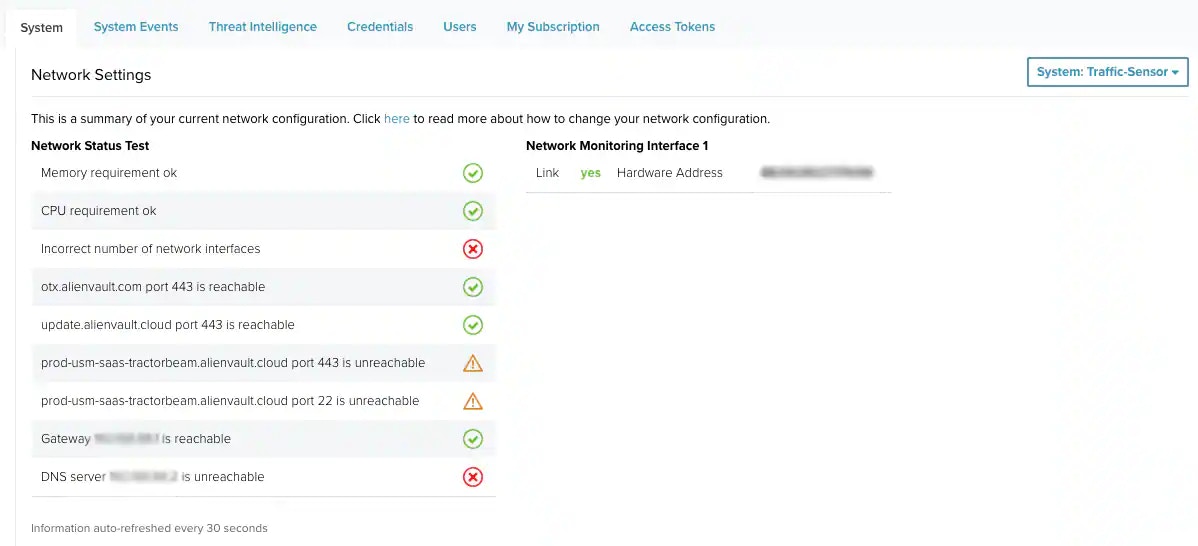
The USM Anywhere Network System page enables the user whose role is Manager to display a summary of the configured network.
**To open the USM Anywhere Network System page**
1. Go to **Settings > System**.
2. In the left navigation panel, click **Network Settings**.
3. In case of having more than one sensor in your environment, select a sensor.
*The Network Status Test st*arts running.
 **Note:** See [Network Setup and Configuration](/documentation/usm-anywhere/deployment-guide/setup/setup-wizard) for more information.