> ## Documentation Index
> Fetch the complete documentation index at: https://docs.levelblue.com/llms.txt
> Use this file to discover all available pages before exploring further.
# Deleting Users
USM Anywhere provides different ways to delete users from your user behavior monitoring:
* Deleting users from the List view
* Deleting users from the User Details page
* Deleting user accounts from the User Details page
**Important:** Deleting a user is an action that cannot be undone.
**To delete a user from the list view**
1. Go to **Environment > Users**.
2. Next to the username you want to delete, click the  icon and select **Delete User**.
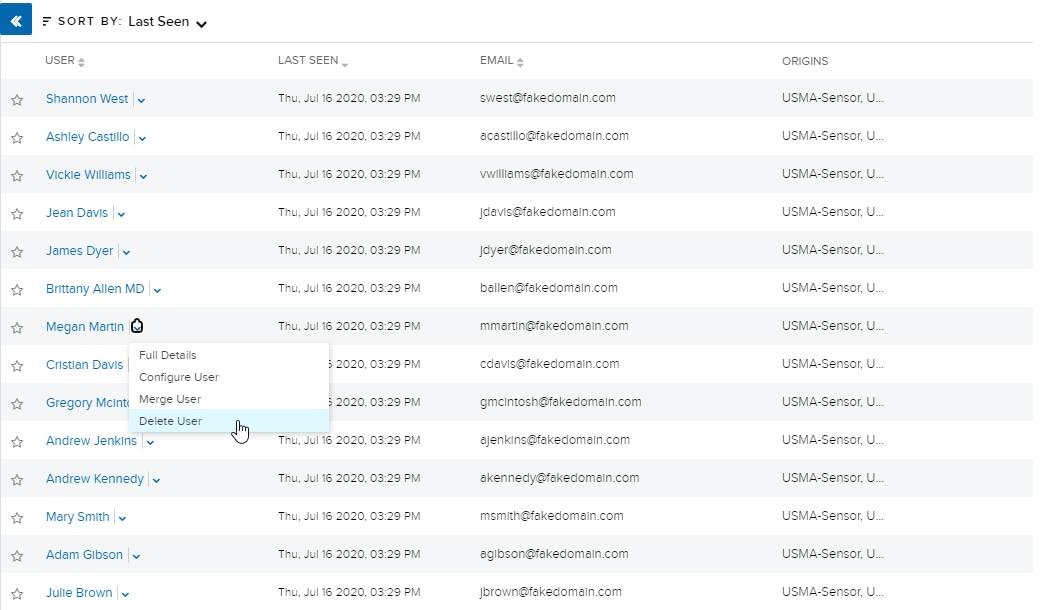 The delete user dialog box opens.
3. Click **Delete**.
**To delete a user from the User Details Page**
1. Go to **Environment > Users**.
2. Next to the username you want to delete, click the icon and select **Full Details**.
3. Click **Actions > Delete User**.
4. The delete user dialog box opens.
5. Click **Delete**.
**To delete a user account**
1. Go to **Environment > Users**.
2. Next to the name of the user whose account you want to delete, click the icon and select **Full Details**.
3. Under the Accounts tab, click the
The delete user dialog box opens.
3. Click **Delete**.
**To delete a user from the User Details Page**
1. Go to **Environment > Users**.
2. Next to the username you want to delete, click the icon and select **Full Details**.
3. Click **Actions > Delete User**.
4. The delete user dialog box opens.
5. Click **Delete**.
**To delete a user account**
1. Go to **Environment > Users**.
2. Next to the name of the user whose account you want to delete, click the icon and select **Full Details**.
3. Under the Accounts tab, click the  icon.
icon.
 The delete user dialog box opens.
4. Click **Delete**.
The delete user dialog box opens.
4. Click **Delete**.