> ## Documentation Index
> Fetch the complete documentation index at: https://docs.levelblue.com/llms.txt
> Use this file to discover all available pages before exploring further.
# Available Remediation Patches for Vulnerabilities
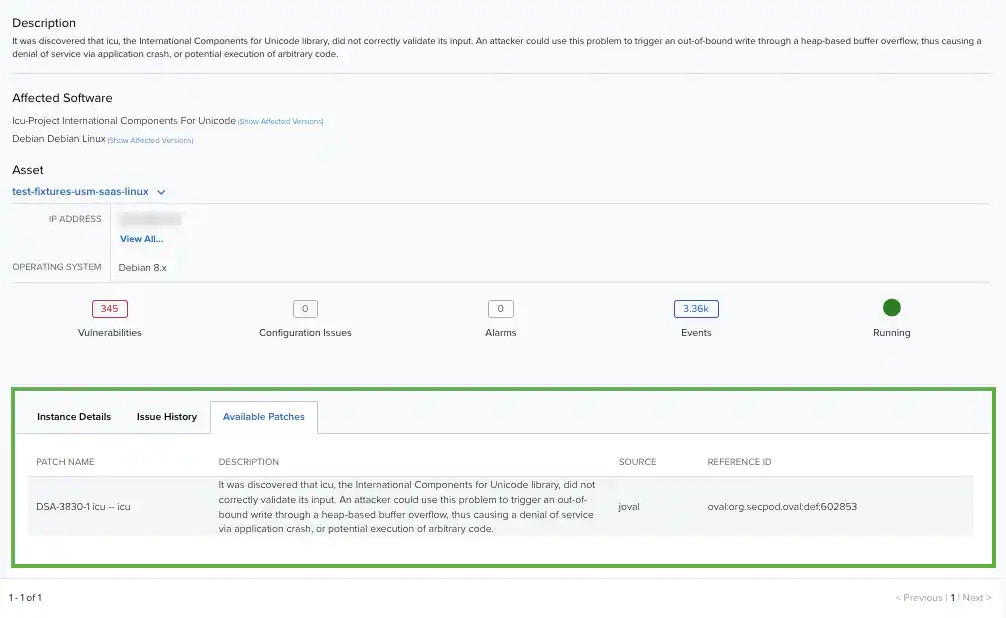
USM Anywhere enables you to display the available remediation patches for a vulnerability. In case of an existing remediation patch for a vulnerability, USM Anywhere displays the patch name, a description, the source, and the reference identification (ID).
**To display the available remediation patches on a vulnerability**
1. Go to **Environment > Vulnerabilities**.
2. Search for the vulnerability where you want to see the available remediation patches. See [Searching Vulnerabilities](/documentation/usm-anywhere/user-guide/vulnerability-assessment/searching-vuln) for more information.
3. Click the vulnerability to open a dialog box with the vulnerability.
4. Click the vulnerability title to open the full details of the vulnerability.
5. Click the **Available Patches** tab.