> ## Documentation Index
> Fetch the complete documentation index at: https://docs.levelblue.com/llms.txt
> Use this file to discover all available pages before exploring further.
# Report Templates in Vulnerabilities
| | | | | |
| --------------------- | ------------- | ---------------- | ----------- | ----------- |
| **Role Availability** | **Read-Only** | **Investigator** | **Analyst** | **Manager** |
USM Anywhere includes a wide range of report templates classified according to the compliance templates for alarms, vulnerabilities, and events collected in the system. The templates are combined into these three groups:
* **PCI:** Payment Card Industry Data Security Standards (PCI DSS) is a set of security standards designed to ensure that all companies that accept, process, store, or transmit credit card information maintain a secure environment. These reports are identified and based on specific PCI DSS requirements to provide the auditor with the specific information requested. For example, PCI DSS requirement 10.7.a: Retain audit trail history for at least one year, with a minimum of three months immediately available for analysis.
* **NIST CSF:** The National Institute of Standards Technology (NIST) Cybersecurity Framework provides a policy framework of computer security guidance for how private sector organizations can assess and improve their ability to prevent, detect, and respond to cyber attacks.
* **ISO 27001:** ISO/IEC 27001 provides guidance for implementing information security controls to achieve a consistent and reliable security program. The ISO and the International Electrotechnical Commission (IEC) developed 27001 to provide requirements for an information security management system (ISMS).
**To apply a report template**
1. Go to **Environment > Vulnerabilities**.
2. From the Vulnerabilities list view, click View above the filters and then select Report Templates.
3. Select a report.
You can use the search field or scroll down the list.
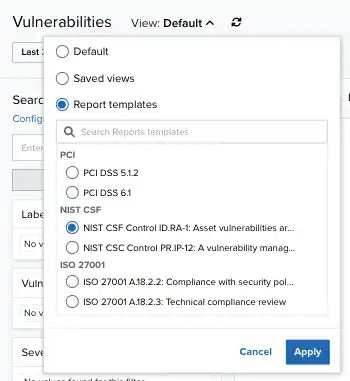 4. Click **Apply**.
The result displays with the filters applied.
4. Click **Apply**.
The result displays with the filters applied.