> ## Documentation Index
> Fetch the complete documentation index at: https://docs.levelblue.com/llms.txt
> Use this file to discover all available pages before exploring further.

# Searching Vulnerabilities

|                       |               |                  |             |             |
| --------------------- | ------------- | ---------------- | ----------- | ----------- |
| **Role Availability** | **Read-Only** | **Investigator** | **Analyst** | **Manager** |

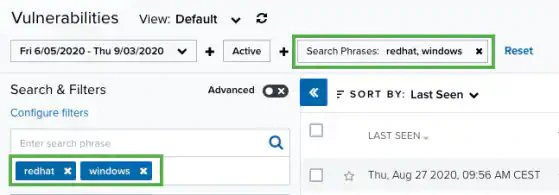
USM Anywhere includes the option of searching items of interest on the page. There are several filters displayed by default. You can either filter your search or enter what you are looking for in the search field.

The following table lists the filters you see on the page.

**Filters Displayed by Default in the Main Vulnerabilities Page**

| Filter Name                                                                                                                                                                                                          | Meaning                                                                                                                                                                                                                                                                                                                                                                                                                                                                                                                                             |
| -------------------------------------------------------------------------------------------------------------------------------------------------------------------------------------------------------------------- | --------------------------------------------------------------------------------------------------------------------------------------------------------------------------------------------------------------------------------------------------------------------------------------------------------------------------------------------------------------------------------------------------------------------------------------------------------------------------------------------------------------------------------------------------- |
| Last 24 Hours                                                                                                                                                                                                        | Filter vulnerabilities triggered in the last hour, last 24 hours, last 7 days, last 30 days, or last 90 days. You can also configure your own period of time by clicking the **Custom Range** option. This option enables you to customize a range. When you click **Custom Range**, a calendar opens. You can choose the first and last day to delimit your search by clicking the days on the calendar or entering the days directly. Then select the hours, minutes, and seconds by clicking the specific box. Finally, select **AM** or **PM**. |
| Active/Inactive                                                                                                                                                                                                      | Filter vulnerabilities by the active or inactive vulnerabilities. See [About Active and Inactive Vulnerabilities](/documentation/usm-anywhere/user-guide/vulnerability-assessment/about-vuln-assess).                                                                                                                                                                                                                                                                                                                                               |
| Labels                                                                                                                                                                                                               | Filter vulnerabilities by the labels applied to the <Tooltip tip="A known issue or weakness in a system, procedure, internal control, software package, or hardware that could be used to compromise security.">vulnerability</Tooltip>. See [Labeling the Vulnerabilities](https://cybersecurity.att.com/documentation/usm-anywhere/user-guide/vulnerability-assessment/labeling-vulnerabilities) for more information.                                                                                                                            |
| Suppressed                                                                                                                                                                                                           | Filter vulnerabilities by whether they are marked as suppressed. See [Viewing Vulnerabilities Details](https://cybersecurity.att.com/documentation/usm-anywhere/user-guide/vulnerability-assessment/viewing-vulns-details) for more information.                                                                                                                                                                                                                                                                                                    |
| Vulnerability Name                                                                                                                                                                                                   | Filter vulnerabilities by name of the vulnerability.                                                                                                                                                                                                                                                                                                                                                                                                                                                                                                |
| Severity                                                                                                                                                                                                             | Filter vulnerabilities by severity of the vulnerability. Values are High, Medium, and Low. See [About Vulnerability Severity](https://cybersecurity.att.com/documentation/usm-anywhere/user-guide/vulnerability-assessment/about-vuln-assess).                                                                                                                                                                                                                                                                                                      |
| Source                                                                                                                                                                                                               | Filter vulnerabilities by the source that found the vulnerability.                                                                                                                                                                                                                                                                                                                                                                                                                                                                                  |
| Asset                                                                                                                                                                                                                | Filter vulnerabilities of the <Tooltip tip="An IP-addressable host, including but not limited to network devices, virtual servers, and physical servers.">asset</Tooltip> that is vulnerable.                                                                                                                                                                                                                                                                                                                                                       |
| Asset Groups                                                                                                                                                                                                         | This is the <Tooltip tip="Asset groups are administratively created objects that group similar assets for specific purposes.">asset group</Tooltip> that has vulnerable asset. The number between parentheses indicates the number of assets in the asset group.                                                                                                                                                                                                                                                                                    |
| The number between brackets displayed by each filter indicates the number of items that matches the filter. You can also use the filter controls to provide a method of organizing your search and filtered results. |                                                                                                                                                                                                                                                                                                                                                                                                                                                                                                                                                     |

The following table shows the icons displayed with each filter box.

**Icons Next to the Filter Title**

| Icon                                                                                                                                                                                                                                                                                                                                                                                                                                                                                                                                                                                                                                                                                                                                                                                                                                                                                                                                                                                                                                                                                                                                                                                                                                                                                                                                                                                                                                                                                                                                                                                                                                                                                                                                                                                                                                                                                                                                                                                                                                                                                                                                                                                                                                                                                                                                                                                                                                                                                                                                                                                                                                                                                                                                                                                                                                                                                                                                                                                                                                                                                                           | Meaning                                                |
| -------------------------------------------------------------------------------------------------------------------------------------------------------------------------------------------------------------------------------------------------------------------------------------------------------------------------------------------------------------------------------------------------------------------------------------------------------------------------------------------------------------------------------------------------------------------------------------------------------------------------------------------------------------------------------------------------------------------------------------------------------------------------------------------------------------------------------------------------------------------------------------------------------------------------------------------------------------------------------------------------------------------------------------------------------------------------------------------------------------------------------------------------------------------------------------------------------------------------------------------------------------------------------------------------------------------------------------------------------------------------------------------------------------------------------------------------------------------------------------------------------------------------------------------------------------------------------------------------------------------------------------------------------------------------------------------------------------------------------------------------------------------------------------------------------------------------------------------------------------------------------------------------------------------------------------------------------------------------------------------------------------------------------------------------------------------------------------------------------------------------------------------------------------------------------------------------------------------------------------------------------------------------------------------------------------------------------------------------------------------------------------------------------------------------------------------------------------------------------------------------------------------------------------------------------------------------------------------------------------------------------------------------------------------------------------------------------------------------------------------------------------------------------------------------------------------------------------------------------------------------------------------------------------------------------------------------------------------------------------------------------------------------------------------------------------------------------------------------------------- | ------------------------------------------------------ |
| <img src="https://mintcdn.com/levelblue-5324744e/9HhQ6wK11ydctaHc/images/usm-anywhere/sort-alpha-asc.svg?fit=max&auto=format&n=9HhQ6wK11ydctaHc&q=85&s=a9c6b8faafa79843b1f00f735b7e14f4" className="inline" width="20" height="20" data-path="images/usm-anywhere/sort-alpha-asc.svg" /><img src="https://mintcdn.com/levelblue-5324744e/9HhQ6wK11ydctaHc/images/usm-anywhere/sort-alpha-desc.svg?fit=max&auto=format&n=9HhQ6wK11ydctaHc&q=85&s=169764eec53609943e2e8f71b4cd1760" className="inline" width="20" height="20" data-path="images/usm-anywhere/sort-alpha-desc.svg" />                 | Sort the filters alphabetically.                       |
| <img src="https://mintcdn.com/levelblue-5324744e/9HhQ6wK11ydctaHc/images/usm-anywhere/sort-amount-asc.svg?fit=max&auto=format&n=9HhQ6wK11ydctaHc&q=85&s=3cf7a079d2a123fd53ff129b5b586a18" className="inline" width="20" height="20" data-path="images/usm-anywhere/sort-amount-asc.svg" /><img src="https://mintcdn.com/levelblue-5324744e/9HhQ6wK11ydctaHc/images/usm-anywhere/sort-amount-desc.svg?fit=max&auto=format&n=9HhQ6wK11ydctaHc&q=85&s=51239b6c9352199c844fa79c8aaea36f" className="inline" width="20" height="20" data-path="images/usm-anywhere/sort-amount-desc.svg" /> | Sort the filters by number of items that matches them. |

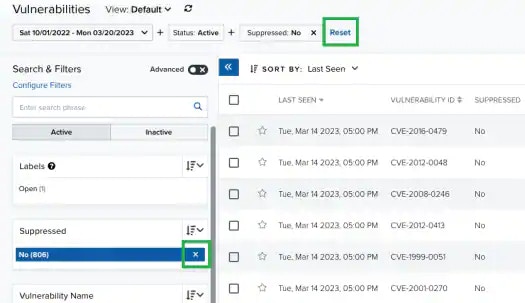
In the upper-left side of the page, you can see any filters you have applied. Remove filters by clicking the <img src="https://mintcdn.com/levelblue-5324744e/jo1779yzvGjLisJx/images/usm-anywhere/close-thin.svg?fit=max&auto=format&n=jo1779yzvGjLisJx&q=85&s=9559f77128e397d6b3626597fba1834f" className="inline" width="24" height="24" data-path="images/usm-anywhere/close-thin.svg" /> icon next to the filter. Or clear all filters by clicking **Reset**.
<Frame>
  <img src="https://mintcdn.com/levelblue-5324744e/MlnJpGwLYAWOIbAS/images/usm-anywhere/resetfilters_new_525x303.webp?fit=max&auto=format&n=MlnJpGwLYAWOIbAS&q=85&s=9d8724027c2593323c83291964511e46" alt="" width="525" height="303" data-path="images/usm-anywhere/resetfilters_new_525x303.webp" />
</Frame>

<Note>
  **Note:** When applying filters, the search uses the logical AND operator if the used filters are different. However, when the filter is of the same type, the search uses the logical OR operator.
</Note>

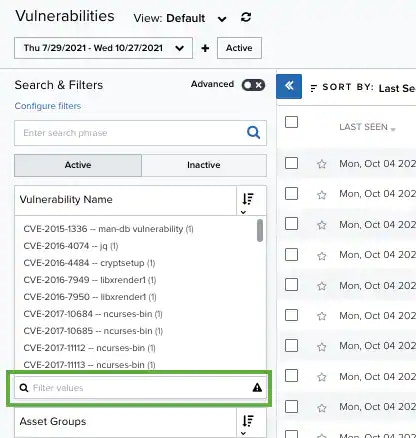
Those filters that have more than 10 options include a Filter Values search field for writing text and making the search easier. If there are more than 50 search results, a <img src="https://mintcdn.com/levelblue-5324744e/4DqIkkHXfajRhiCc/images/usm-anywhere/warning-black.svg?fit=max&auto=format&n=4DqIkkHXfajRhiCc&q=85&s=57d9e61bd15470c226e15d91c2241937" className="inline" width="20" height="20" data-path="images/usm-anywhere/warning-black.svg" /> icon appears to the right of the **Filter Values** search field. Click this icon to download a CSV containing up to 1024 results.
<Frame>
  <img src="https://mintcdn.com/levelblue-5324744e/3onSl9Btf_NxCVCb/images/usm-anywhere/filtervaluesearchfield.webp?fit=max&auto=format&n=3onSl9Btf_NxCVCb&q=85&s=28b217ef16d1d6c5abf419b273e7c417" alt="" width="416" height="438" data-path="images/usm-anywhere/filtervaluesearchfield.webp" />
</Frame>

**To search for Vulnerabilities using the search field**

1. Go to **Environment > Vulnerabilities**.

2. Enter your query in the search field.
   If you want to search for an exact phrase having two or more words, you need to put quotation marks around the words in the phrase. This includes email addresses (for example, "[bob@mycompany.com](mailto:bob@mycompany.com)").

   <Note>
     Note: Wildcard characters are considered as literal characters.
   </Note>

3. Click the <img src="https://mintcdn.com/levelblue-5324744e/9tSTfP28zp9Kgwsi/images/usm-anywhere/search-linked.svg?fit=max&auto=format&n=9tSTfP28zp9Kgwsi&q=85&s=f038592ceede06c3c23f2d91a9f6c2b8" className="inline" width="24" height="24" data-path="images/usm-anywhere/search-linked.svg" /> icon.

   <Frame>
     <img src="https://mintcdn.com/levelblue-5324744e/MlnJpGwLYAWOIbAS/images/usm-anywhere/searchfield_559x195.webp?fit=max&auto=format&n=MlnJpGwLYAWOIbAS&q=85&s=42258be9b7c770565c27681eca099f2c" alt="" width="559" height="195" data-path="images/usm-anywhere/searchfield_559x195.webp" />
   </Frame>

The result of your search displays with the items identified.