> ## Documentation Index
> Fetch the complete documentation index at: https://docs.levelblue.com/llms.txt
> Use this file to discover all available pages before exploring further.
# Firewall Permissions
| | | |
| ----------------------- | ------------------ | -------------------- |
| **Applies to Product:** | **USM Appliance™** | **LevelBlue OSSIM®** |
USM Appliance components must use particular URLs, protocols, and ports to function correctly.
**Note:** If deploying USM Appliance All-in-One, you only need to open the ports associated with the monitored assets, because All-in-One includes both USM Appliance Server and USM Appliance Sensor, therefore the communication between them becomes internal.
If your company operates in a highly secure environment, you must change some permissions on your firewall(s) for USM Appliance to gain access.
**External URLs and port numbers used by USM Appliance features**
| Server URL | Port Number | LevelBlue Features in Use | Applicable Release |
| ---------------------------------------------------------------------------------------------------------------------------------------------------------------------------------------------------------- | ----------- | ----------------------------------------------------------------------------------------------------------------------------------------------------------------------------------------------------------------------------------------------------------------------- | ------------------ |
| data.alienvault.com | 80 | USM Appliance product and feed update | All |
| maps-api-ssl.google.com
maps.googleapis.com | 443 | Asset Location | All |
| maps.google.com
maps.gstatic.com | 80 | Asset Location | All |
| messages.alienvault.com | 443 | Message Center | All |
| otx.alienvault.com1 | 443 | Open Threat Exchange® | 5.1+ |
| reputation.alienvault.com | 443 | USM Appliance IP Reputation | All |
| tractorbeam.alienvault.com | 22, 443 | Remote Support | All |
| [www.google.com](http://www.google.com)2 | 80 | USM Appliance API | All |
| cybersecurity.att.com/product/help/ping.php3 | 443 | Detects if the USM Appliance component is online | All |
The following diagram shows the port numbers used by the USM Appliance components to communicate with each other and with the monitored assets. The direction of the arrows indicate the direction of the network traffic.
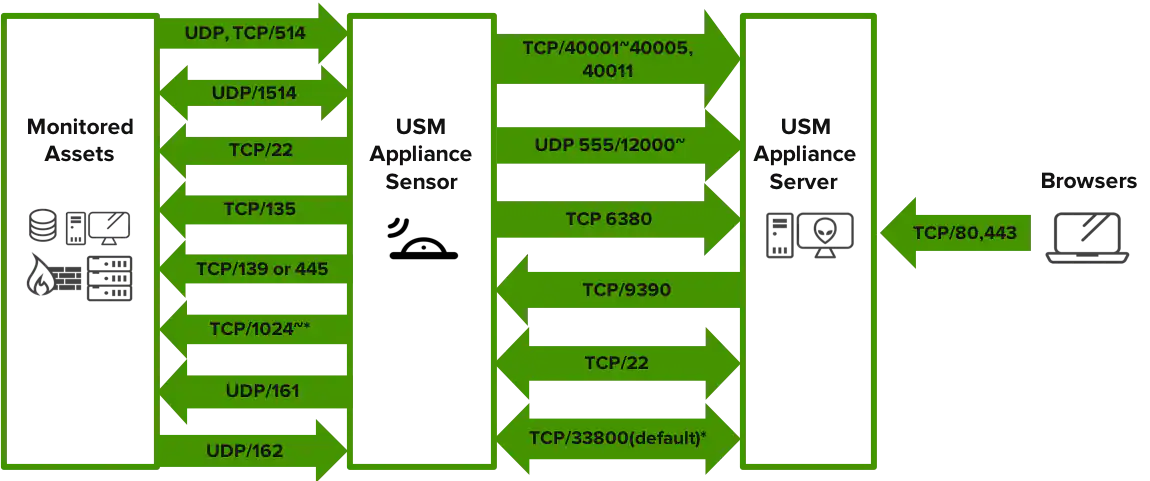 Port numbers used between USM Appliance components
**Important:** Ports labeled with \* are optional.
* On the hosts you plan to deploy the LevelBlue HIDS agents, to allow for initial deployment, you must open TCP port 135, either TCP port 139 or TCP port 445, and high TCP ports (1024 or above). See Microsoft's documentation on port requirements for Distributed File System Namespaces (DFSN).
* You also need to open UDP port 1514 for ongoing communication between the LevelBlue HIDS agent and the USM Appliance Sensor. For assistance on deployment, see Deploy LevelBlue HIDS Agents.
* To use SNMP in USM Appliance, you need to open UDP port 161 on the SNMP agent and UDP port 162 on the USM Appliance Sensor. For more details, see SNMP Configuration in USM Appliance.
* If running USM Appliance versions prior to 5.6.5, you also need to open TCP port 9391 on the Sensor for the vulnerability scanner. But starting from version 5.6.5, vulnerability scans are conducted using the UNIX domain sockets, so port 9391 is no longer used.
## About the Use of VPN
Port 33800 shown in the diagram is a default and only used when VPN is enabled. You may use a different port for VPN, if desired.
**Note:** When enabling the VPN, you do not need to open the other ports between the USM Appliance Sensor and the USM Appliance Server, because all communication goes through the VPN tunnel.
If you enable VPN, in addition to having port 33800/TCP open for the VPN tunnel, you also need to allow TLS transport for that port in case you use a firewall/security device that can perform inspection or interception of TLS traffic.
Port numbers used between USM Appliance components
**Important:** Ports labeled with \* are optional.
* On the hosts you plan to deploy the LevelBlue HIDS agents, to allow for initial deployment, you must open TCP port 135, either TCP port 139 or TCP port 445, and high TCP ports (1024 or above). See Microsoft's documentation on port requirements for Distributed File System Namespaces (DFSN).
* You also need to open UDP port 1514 for ongoing communication between the LevelBlue HIDS agent and the USM Appliance Sensor. For assistance on deployment, see Deploy LevelBlue HIDS Agents.
* To use SNMP in USM Appliance, you need to open UDP port 161 on the SNMP agent and UDP port 162 on the USM Appliance Sensor. For more details, see SNMP Configuration in USM Appliance.
* If running USM Appliance versions prior to 5.6.5, you also need to open TCP port 9391 on the Sensor for the vulnerability scanner. But starting from version 5.6.5, vulnerability scans are conducted using the UNIX domain sockets, so port 9391 is no longer used.
## About the Use of VPN
Port 33800 shown in the diagram is a default and only used when VPN is enabled. You may use a different port for VPN, if desired.
**Note:** When enabling the VPN, you do not need to open the other ports between the USM Appliance Sensor and the USM Appliance Server, because all communication goes through the VPN tunnel.
If you enable VPN, in addition to having port 33800/TCP open for the VPN tunnel, you also need to allow TLS transport for that port in case you use a firewall/security device that can perform inspection or interception of TLS traffic.