> ## Documentation Index
> Fetch the complete documentation index at: https://docs.levelblue.com/llms.txt
> Use this file to discover all available pages before exploring further.
# Alarms Management
USM Central provides a consolidated view of any alarms triggered within all of your connected deployments. The displayed alarms in USM Central are compiled from the connected deployments. An alarm consists of one or more events, based on the following:
* One or more rules performed by the correlation engine of USM Anywhere or USM Appliance, which analyzes these events for behavioral patterns. These rules look at and connect events to assess their priority and reliability and, when the system identifies a pattern, it generates an alarm, which requires attention and investigation. See [Correlation Rules](/documentation/usm-anywhere/user-guide/rules-management/correlation-rules) for more information.
* One orchestration rule, which is designed to raise an alarm when a particular type of event is found. See [Orchestration Rules Management](/documentation/usm-central/rules-management/rules-management) for more information.
USM Central displays the first 10 events associated with an alarm. If you need to see more events, you can drill into the specific deployment that created the original alert. See [Drill Down to a Specific Deployment](/documentation/usm-central/view-deployments) for more information.
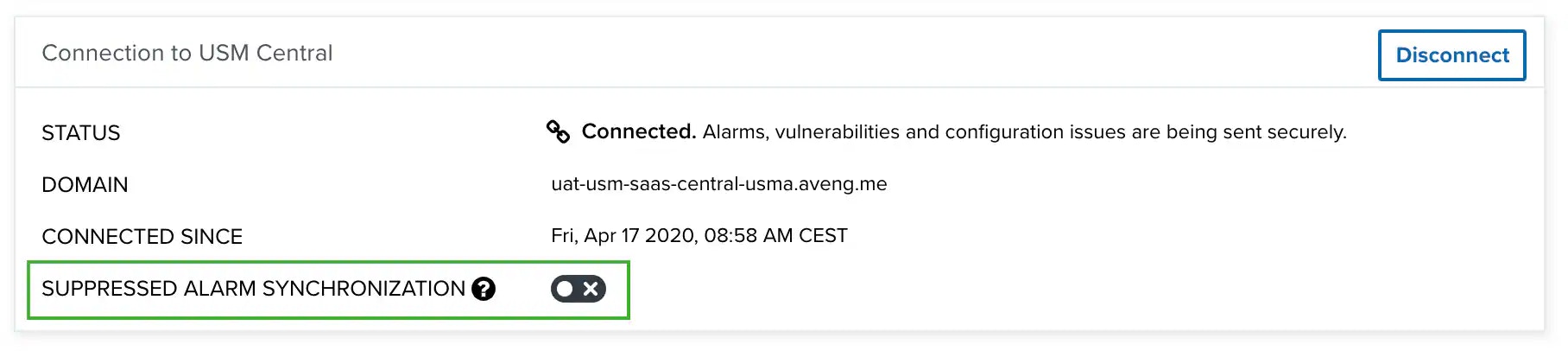
Alarms in USM Anywhere that are suppressed or have a closed status are, by default, not forwarded to USM Central. You can have them forwarded from USM Anywhere by going to **Settings > My Subscription** in USM Anywhere and clicking the **Suppressed Alarm Synchronization** toggle.
 Topics covered in this section include:
* [Alarms List View](/documentation/usm-central/alarms/alarms-list-view)
* [Alarms List Columns](/documentation/usm-central/alarms/alarms-list-columns)
* [Configuring Columns on Alarms](/documentation/usm-central/alarms/alarms-list-conf-columns)
* [Priority Field for Alarms](/documentation/usm-central/alarms/alarms-list-priority-field)
* [Alarms Views](/documentation/usm-central/alarms/views)
* [Selecting Alarms in Alarm List View](/documentation/usm-central/alarms/selecting-alarms)
* [Searching Alarms](/documentation/usm-central/alarms/searching-alarms)
* [View Alarm Details](/documentation/usm-central/alarms/view-alarms-details)
* [Creating Rules from Alarms](/documentation/usm-central/alarms/creating-rules-from-alarms)
* [Creating Suppression Rules from the Alarms Page](/documentation/usm-central/alarms/suppression-rule)
* [Creating Notification Rules from the Alarms Page](/documentation/usm-central/alarms/notification-rule)
* [Searching Events from the Details of an Alarm](/documentation/usm-central/alarms/searching-details-alarms)
* [Labeling the Alarms](/documentation/usm-central/alarms/labeling-alarms)
* [Alarm Status](/documentation/usm-central/alarms/alarm-status)
* [Create an Alarms Report](/documentation/usm-central/alarms/exporting-alarms)
Topics covered in this section include:
* [Alarms List View](/documentation/usm-central/alarms/alarms-list-view)
* [Alarms List Columns](/documentation/usm-central/alarms/alarms-list-columns)
* [Configuring Columns on Alarms](/documentation/usm-central/alarms/alarms-list-conf-columns)
* [Priority Field for Alarms](/documentation/usm-central/alarms/alarms-list-priority-field)
* [Alarms Views](/documentation/usm-central/alarms/views)
* [Selecting Alarms in Alarm List View](/documentation/usm-central/alarms/selecting-alarms)
* [Searching Alarms](/documentation/usm-central/alarms/searching-alarms)
* [View Alarm Details](/documentation/usm-central/alarms/view-alarms-details)
* [Creating Rules from Alarms](/documentation/usm-central/alarms/creating-rules-from-alarms)
* [Creating Suppression Rules from the Alarms Page](/documentation/usm-central/alarms/suppression-rule)
* [Creating Notification Rules from the Alarms Page](/documentation/usm-central/alarms/notification-rule)
* [Searching Events from the Details of an Alarm](/documentation/usm-central/alarms/searching-details-alarms)
* [Labeling the Alarms](/documentation/usm-central/alarms/labeling-alarms)
* [Alarm Status](/documentation/usm-central/alarms/alarm-status)
* [Create an Alarms Report](/documentation/usm-central/alarms/exporting-alarms)