> ## Documentation Index
> Fetch the complete documentation index at: https://docs.levelblue.com/llms.txt
> Use this file to discover all available pages before exploring further.
# Searching Vulnerabilities
USM Central includes the option of searching items of interest on the page. There are several filters displayed by default. You can either filter your search or enter what you are looking for in the search field.
This table shows the filters displayed by default in the main Vulnerabilities page.
**Filters Displayed by Default in the Main Vulnerabilities Page**
| Filter Name | Meaning |
| ------------------ | ----------------------------------------------------------------------------------------------------------------------------------------------------------------------------------------------------------------------------------------------------------------------------------------------------------------------------------------------------------------------------------------------------------------------------------------------------------------------------------------------------------------------------------------------------------------------------------------------------------------------------------------------------------------------------------------------- |
| Last 24 Hours | Identify vulnerabilities triggered in the last hour, 24 hours, 7 days, 30 days, or 90 days. You can also configure your own period of time by clicking the **Custom Range** option. This option enables you to customize a range. When you click **Custom Range**, a calendar opens. You can choose the first and last day to delimit your search by clicking the days on the calendar or entering the days directly. Then select the hours, minutes, and seconds by clicking the specific box. Finally, select AM or PM. |
| Active/Inactive | Filter vulnerabilities by the active or inactive vulnerabilities. |
| Deployment | Filter vulnerabilities by the name of the deployment on which the vulnerability has been detected. |
| Labels | Filter vulnerabilities by the labels applied to the vulnerability. See [Labeling the Vulnerabilities](/usm-central/vulnerabilities/labeling-vulnerabilities) for more information. |
| Vulnerability Name | Filter vulnerabilities by the name of the vulnerability. |
| Severity | Filter vulnerabilities by the severity of the vulnerability. Values are High, Medium, and Low. See [About Vulnerability Severity](/usm-anywhere/user-guide/vulnerability-assessment/about-vuln-assess#aboutVulnSeverity) for more information. |
| Asset | Filter vulnerabilities of the asset that is vulnerable. |
**To search for Vulnerabilities using the search field**
1. Go to Vulnerabilities.
2. Enter your query in the search field.
If you want to search for an exact phrase having two or more words, you need to put quotation marks around the words in the phrase. This includes email addresses (for example, "[bob@mycompany.com](mailto:bob@mycompany.com)").
Wildcard characters are considered as literal characters.
3. Click the  icon.
## Filtering Vulnerabilities
You can use filters to delimit the number of vulnerabilities that display in the List view in the Vulnerabilities page. You can also save filter views to easily use later. Your active filters will be used for reports exports.
The number between brackets displayed by each filter indicates the number of items that matches the filter. You can also use the filter controls to provide a method of organizing your search and filtered results.
The following table shows the icons displayed with each filter box.
**Icons Next to the Filter Title**
| Icon | Meaning |
| ------------------------------------------------------------------------------------------------------------------------------------------------------------------------------------------------------------------------------------------------------------------------------------------------------------------------------------------------------------------------------------------------------------------------------------------------------------------------------------------------------------------------------------------------------------------------------------------------------------------------------------------------------------------------------------------------------------------------------------------------------------------------------------------------------------------------------------------------------------------------------------------------------------------------------------------------------------------------------------------------------------------------------------------------------------------------------------------------------------------------------------------------------------------------------------------------------------------------------------------------------------------------------------------------------------------------------------------------------------------------------------------------------------------------------------------------------------------------------------------------------------------------------------------------------------------------------------------------------------------------------------------------------------------------------------------------------------------------------------------------------------------------------------------------------------------------------------------------------------------------------------------------------------------------------------------------------------------------------------------------------------------------------------------------------------------------------------------------------------------------------------------------------------------------------------------------------------------------------------------------------------------------------------------------------------------------------------------------------------------------------------------------------------------------------------------------------------------------------------------------------------------------------------------------------------------------------------------------------------------------------------------------------------------------------------------------------------------------------------------------------------------------------------------------------------------------------------------------------------------------------------------------------------------------------------------------------------------------------------------------------------------------------------------------------------------------------------------------------ | ----------------------------------------------------- |
|
icon.
## Filtering Vulnerabilities
You can use filters to delimit the number of vulnerabilities that display in the List view in the Vulnerabilities page. You can also save filter views to easily use later. Your active filters will be used for reports exports.
The number between brackets displayed by each filter indicates the number of items that matches the filter. You can also use the filter controls to provide a method of organizing your search and filtered results.
The following table shows the icons displayed with each filter box.
**Icons Next to the Filter Title**
| Icon | Meaning |
| ------------------------------------------------------------------------------------------------------------------------------------------------------------------------------------------------------------------------------------------------------------------------------------------------------------------------------------------------------------------------------------------------------------------------------------------------------------------------------------------------------------------------------------------------------------------------------------------------------------------------------------------------------------------------------------------------------------------------------------------------------------------------------------------------------------------------------------------------------------------------------------------------------------------------------------------------------------------------------------------------------------------------------------------------------------------------------------------------------------------------------------------------------------------------------------------------------------------------------------------------------------------------------------------------------------------------------------------------------------------------------------------------------------------------------------------------------------------------------------------------------------------------------------------------------------------------------------------------------------------------------------------------------------------------------------------------------------------------------------------------------------------------------------------------------------------------------------------------------------------------------------------------------------------------------------------------------------------------------------------------------------------------------------------------------------------------------------------------------------------------------------------------------------------------------------------------------------------------------------------------------------------------------------------------------------------------------------------------------------------------------------------------------------------------------------------------------------------------------------------------------------------------------------------------------------------------------------------------------------------------------------------------------------------------------------------------------------------------------------------------------------------------------------------------------------------------------------------------------------------------------------------------------------------------------------------------------------------------------------------------------------------------------------------------------------------------------------------------------ | ----------------------------------------------------- |
| 
 | Sort the filters alphabetically. |
|
| Sort the filters alphabetically. |
| 
 | Sort the filters by number of items that matches them |
In the upper-left side of the page, you can see any filters you have applied. Remove filters by clicking the
| Sort the filters by number of items that matches them |
In the upper-left side of the page, you can see any filters you have applied. Remove filters by clicking the  icon next to the filter. Or clear all filters by clicking **Reset**.
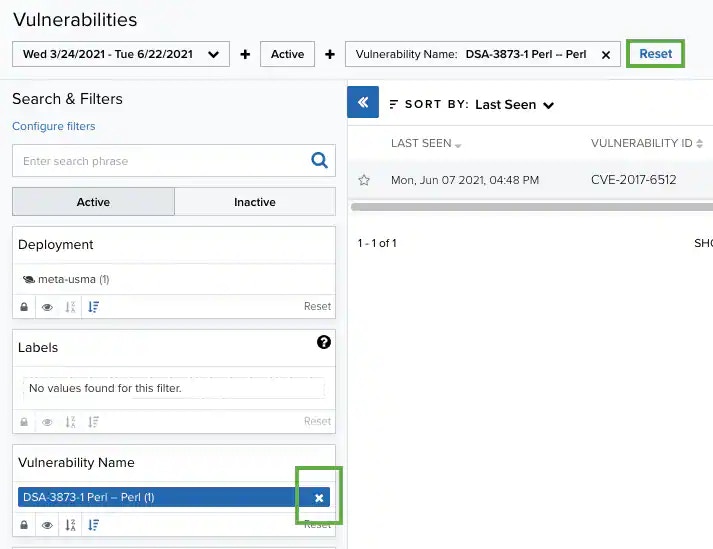 When applying filters, the search uses the logical AND operator if the used filters are different. However, when the filter is of the same type, the search uses the logical OR operator.
Those filters that have more than 10 options include a Filter Value search field for writing text and making the search easier.
**To search vulnerabilities using a filter**
1. Go to **Vulnerabilities**.
2. Click a filter.
The result of your search displays the identified vulnerabilities.
**To save a filter configuration**
1. Go to **Vulnerabilities** and select the filters you want to use in your saved view.
2. Select the **Save View** drop-down list and then click **Save as**.
3. Enter a name for the view and click **Save**.
You can now load this view from the View drop-down list.
When applying filters, the search uses the logical AND operator if the used filters are different. However, when the filter is of the same type, the search uses the logical OR operator.
Those filters that have more than 10 options include a Filter Value search field for writing text and making the search easier.
**To search vulnerabilities using a filter**
1. Go to **Vulnerabilities**.
2. Click a filter.
The result of your search displays the identified vulnerabilities.
**To save a filter configuration**
1. Go to **Vulnerabilities** and select the filters you want to use in your saved view.
2. Select the **Save View** drop-down list and then click **Save as**.
3. Enter a name for the view and click **Save**.
You can now load this view from the View drop-down list.
 If you have changed the configuration of the vulnerabilities within the List view columns, this configuration will also be saved together with the filter configuration. See [Vulnerabilities Page List View](/usm-central/vulnerabilities/vulnerabilities-list-view) for more information.
**To add or delete filters from the Search & Filters area**
1. Go to **Vulnerabilities**.
2. Click the **Configure Filters** link at the bottom of the Search & Filters sidebar to open the Filters Configuration window.
3. Click the arrow icons (
If you have changed the configuration of the vulnerabilities within the List view columns, this configuration will also be saved together with the filter configuration. See [Vulnerabilities Page List View](/usm-central/vulnerabilities/vulnerabilities-list-view) for more information.
**To add or delete filters from the Search & Filters area**
1. Go to **Vulnerabilities**.
2. Click the **Configure Filters** link at the bottom of the Search & Filters sidebar to open the Filters Configuration window.
3. Click the arrow icons ( ) and (
 ) to pass the items from the Available Filters and Selected Filters columns, and then click **Apply**.
