

Introduction
Although the Internet is an essential tool for any business, it can limit productivity and increase risk. Many organizations use written policies to govern acceptable use of the Internet but lack the capacity for policy enforcement. WebMarshal offers industry-leading web filtering technology and flexible access control, providing both monitoring and enforcement of these policies.What is WebMarshal?
WebMarshal is an employee Internet management solution, designed to promote responsible web use while providing protection from viruses, malware, confidentiality breaches, and downloading of non-business material. It provides an additional layer of security beyond what is offered by traditional Internet firewalls and proxy servers.What does WebMarshal do?
WebMarshal helps to eliminate non-business and potentially objectionable browsing and file uploading, trimming bandwidth needs, reducing time-wasting, shielding the organization from exposure to legal liability threats, and reducing the organization’s Total Cost of Ownership for web connectivity. WebMarshal is implemented as an authenticating proxy server for HTTP, HTTPS, and FTP protocols. WebMarshal can provide policy-based control of HTTP connection attempts from web browsers, as well as many streaming media and instant messaging applications. Where support for other protocols is required, WebMarshal can be used in conjunction with other proxy servers running on any platform. WebMarshal allows you to monitor and enforce organizational Web access policy based on such factors as URL, file type and size, time of day, virus and malware checks, and file contents. WebMarshal can apply browsing time and volume quotas to limit web usage. WebMarshal also provides “zero-day” protection against malicious content using the TRACEnet filtering framework. TRACEnet is updated many times a day using blended threat data generated by the LevelBlue SpiderLabs team. In addition to the real-time content checking mentioned above, WebMarshal can also use the LevelBlue Web Filter Database and URLCensor (a DNS based real time URL checking service). To assist with bandwidth management, WebMarshal offers optional proxy caching for HTTP. You can monitor details of current Web access sessions using the WebMarshal Console. You can install one or more copies of the Console on workstations in your network. WebMarshal can log Web access requests and use the information to produce detailed reports. Information is logged to a SQL Server database. You can generate reports using the web based Marshal Reporting Console. WebMarshal can also log activity to text logs in W3C or WELF format. You can analyze these logs with external tools. You can install WebMarshal as a single server, or as an array of servers (at one or more locations) with a common configuration. WebMarshal supports installation on current versions of Windows. WebMarshal can authenticate users based on Windows login or Novell NDS login. WebMarshal can also control Web access on a per-workstation basis.How does WebMarshal work?
The WebMarshal Processing Server(s) function as the web gateway of an organization. When a Web request is received, WebMarshal records the user name or workstation, time of day, and requested URL. WebMarshal then retrieves basic information about the requested resource from the remote server (or the WebMarshal proxy cache, if enabled). WebMarshal next evaluates the request using the organization’s Web access policy. At any stage of the evaluation, the request can be permitted, denied, or permitted with a warning. If TRACEnet is enabled, WebMarshal checks the TRACEnet database and blocks the request if appropriate. If Connection Rules are in place, WebMarshal determines the connecting application (such as an Instant Messaging application) and accepts or blocks the attempt. If the request is encrypted using HTTPS, and HTTPS Content Inspection is enabled, WebMarshal checks the protocol version and the validity of the site Certificate. Depending on your policy, WebMarshal can decrypt the traffic (either upload or download) for processing by Quota, Standard, and Content Analysis rules. WebMarshal re-encrypts the traffic for transfer between the WebMarshal server and the client workstation. All data transmitted over networks is encrypted. When WebMarshal evaluates a standard Web request, it first checks time and volume quotas. Next, WebMarshal checks the URL of the requested resource. After full data has been returned to WebMarshal from the Web, the results can be evaluated by file type and size, checked for viruses and malware, stripped of cookies, and checked for specific text content before being returned to the user. WebMarshal unpacks archive files and documents, and can apply evaluation to all unpacked files. WebMarshal can apply TextCensor rules to evaluate text content of files. TextCensor can check HTML pages, other text files, and text unpacked from archives or Word documents. Based on the result of this evaluation, WebMarshal can block the request and/or add the URL to a URL Category, potentially denying future access to the entire site. When a file or form submission is submitted for upload, it is evaluated against all criteria before being sent. WebMarshal can enforce Safe Search on selected search engines. Both successful and denied requests can be logged to the WebMarshal database (unless they are explicitly excluded from logging). Data logged includes user account, workstation, URL, time, permission or denial, quota usage, and one or more custom classifications according to the organization’s rules. This information is available for later reporting. WebMarshal can also notify administrators of specific actions or notify end-users of blocked pages. You can associate the appropriate rule action when you create or modify rules.Configuring WebMarshal
You configure WebMarshal rules and server options using the Console connected to the WebMarshal Array Manager. The Array Manager coordinates the activity of all other WebMarshal Servers in the array, and optionally logs information to the database. Database software for the optional WebMarshal database is often installed on the same computer as the WebMarshal Array Manager component. The database stores the reporting data used by Marshal Reporting Console. WebMarshal supports the use of recent versions of Microsoft SQL Server. Smaller organizations can use the free Express editions of Microsoft SQL Server. For details, see Additional software.Monitoring and reporting
WebMarshal provides user interfaces for monitoring and daily administration of Web access policy. Using the Console, administrators can monitor server performance, review user sessions and web browsing activity, and adjust user permissions and quotas. Administrators and managers can generate reports on WebMarshal activity with a choice of reporting options:- The Marshal Reporting Console is a web-based application that can be deployed to support reporting on WebMarshal and MailMarshal. Marshal Reporting Console provides report scheduling and multiple export formats. This application is included for all WebMarshal trial users and customers.
- WebMarshal can also log activity in W3C or WELF format. You can use these text log files with external tools to produce reports that cover different types of proxy and firewall devices.
- WebMarshal can log activity using the Syslog protocol.
Planning your WebMarshal implementation
When planning to install WebMarshal, you should understand how WebMarshal handles Web requests, and the available installation scenarios to suit your needs. This chapter provides information about these concepts and includes hardware requirements, software requirements, and checklists to help you through the planning process.Planning checklist
Plan your WebMarshal installation by reading the following sections and completing the following checklist:Understanding WebMarshal components
WebMarshal implementations include several components. A small organization can install all components on one server. A larger organization can scale WebMarshal by installing the components on a number of different servers and workstations within the network, as shown below.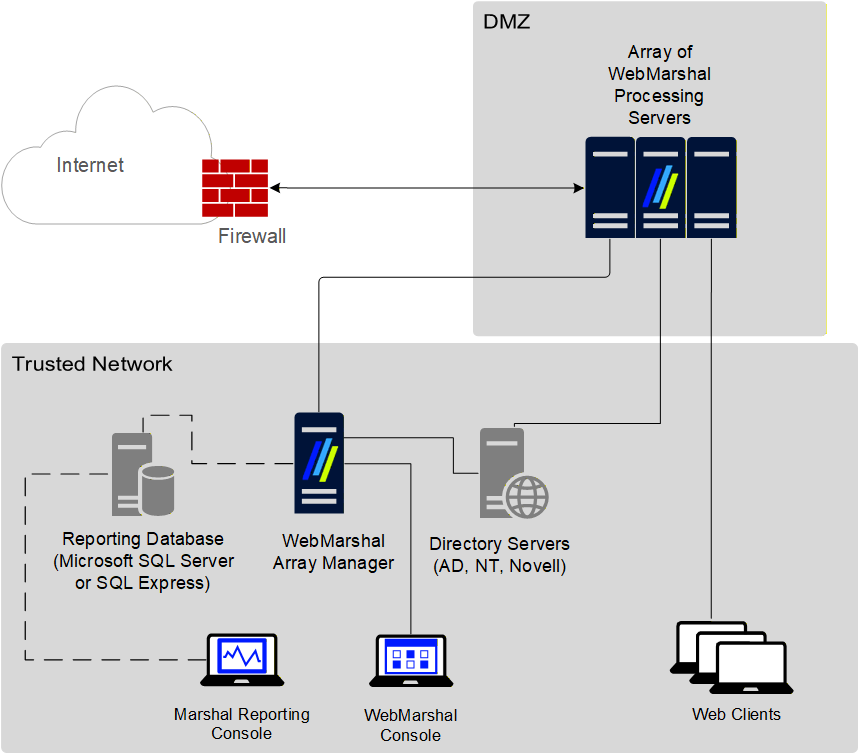
WebMarshal components
WebMarshal components
Array Manager Manages an array of WebMarshal Processing Servers. The Array Manager stores policy and controls communications between components. Processing Server Accepts Web requests, retrieves resources from the Web or local cache (Proxy service), and applies policy in the form of rules (Engine service). You can use one or more WebMarshal Processing Servers in your installation. Processing servers are also known as array nodes.WebMarshal caching uses a local directory to store Web content. This directory must be excluded from on-access or resident virus and malware scanning. If it is not excluded, WebMarshal caching is disabled. The default location of the cache directory is within the WebMarshal install directory, but for most production servers it will be located elsewhere. If you change the location of the cache directory, be sure that you also update virus scanner exclusions.
Other software and services
In addition to the above, most WebMarshal installations use the following software and network services. Microsoft SQL Server or SQL Express If you want to use the Marshal Reporting Console (MRC), you will need a Microsoft SQL Server to host the WebMarshal database that stores log information. If your web traffic volume and log retention requirements permit, you can use the free SQL Express (this could be the SQL Express Advanced instance required by MRC). If the volume of data exceeds the limit imposed by SQL Express, use Microsoft SQL Server. Directory Server If you want to import existing users and groups from your directory service for use in applying a Web Acceptable Use Policy, all WebMarshal servers must be able to connect with your directory server. WebMarshal can connect with Microsoft Active Directory or other Windows environments, as well as Novell NDS/eDirectory. Malware Scanning Software If you want to scan Web content for malware, you can install one or more supported malware scanners. See Supported malware protection software. If you want to ensure protection of your servers, you can install scanning software of your choice on the servers.WebMarshal uses a temporary directory to unpack and scan Web content. This directory must be excluded from on-access or resident virus scanning. If it is not excluded, the WebMarshal Engine and/or the WebMarshal Controller service may be unable to start. By default, WebMarshal uses the
\temp subdirectory of your install directory. You can change this location by editing XML configuration files on each processing server and restarting the WebMarshal services. If you change the location of the temporary directory for either or both services, be sure that you also update virus scanner exclusions.Understanding installation scenarios
When planning a WebMarshal installation, you can use a single server for all functions, or an array of servers. You can install the WebMarshal Proxy Server in several scenarios.Single server or array
You should consider an Array installation of WebMarshal if the following requirements apply:- High or growing Web request volume: An Array allows you to add WebMarshal Processing Servers to provide additional capacity.
- Multiple Web gateways: at separate locations with the same access policies and centralized reporting. A WebMarshal Array Manager can manage policy for multiple gateways over WAN connections, with a single TCP port required for connectivity in many cases.
- Redundancy: Each WebMarshal Processing Server can continue to process requests independently if other servers fail.
To maintain session logging correctly, each client must use a single processing server for an entire browsing session. One way to achieve this requirement is to set up Microsoft Windows Network Load Balancing using the NLB Client “Single Affinity” setting.
WebMarshal Proxy Server
The WebMarshal Proxy Server can be installed in any of three scenarios.In each case you can configure a single WebMarshal server or an array of servers.
-
As a standalone proxy server. In this scenario, all Web requests are passed to the WebMarshal server, and all responses are returned from the Web (or WebMarshal proxy cache) through the WebMarshal server. Firewall rules should be configured to restrict Web traffic so that users cannot bypass WebMarshal.
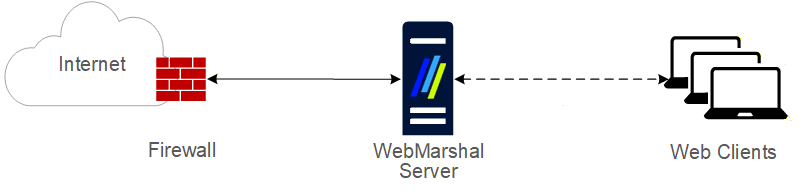
WebMarshal proxy installation
-
Chained to another proxy server running on another physical server. In this scenario, all Web requests are passed to the WebMarshal server. WebMarshal delivers the requests to the other server, and all responses are returned from the Web through the other server to WebMarshal and then to the clients. Firewall rules should be configured to restrict Web traffic so that users cannot bypass WebMarshal. Access rules on the other proxy server should be configured to allow traffic only from WebMarshal.
In any chained installation, WebMarshal usually must be the first server in the chain (the client browsers must connect to WebMarshal directly). If WebMarshal is not the first server in the chain, the WebMarshal access policy will not be applied correctly because the client cannot be determined.
- A proxy server or load balancer can be inserted before WebMarshal if it can forward the client credentials, or if it inserts an X-Forwarded-For header and you use IP based authentication (see LevelBlue Knowledge Base article Q21183).
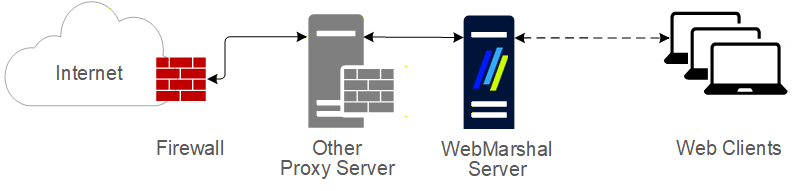
Separate server chained installation
-
Chained to another proxy server running on the same physical server.
If WebMarshal is installed on the same server as another proxy server, each must use a different port. Configure WebMarshal using the WebMarshal Configuration Wizard or the Proxy Settings pages in WebMarshal Global Settings. Be sure the other proxy software is configured appropriately. For example, WebMarshal could be configured to accept requests at the address 10.3.1.1:8080. The other proxy software might use 127.0.0.1:3128. The other proxy should only accept requests from WebMarshal.
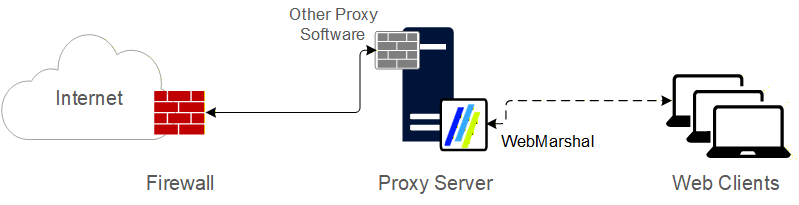
Same server chained installation
System requirements
A single server installation of WebMarshal, or a Processing Server within an array, typically requires the following minimum hardware.Hardware requirements are dependent on the number and complexity of Rules enabled.
- The suggested configuration supports a typical rule set for about 250 to 500 concurrent sessions.
- If the optional WebMarshal reporting database will be hosted using SQL Express on the same computer, additional free disk space and RAM will be required.
- If optional URL Filtering Lists will be used, please see Chapter 12, WebMarshal and filtering lists for additional requirements
Additional software
Some scenarios require the following additional software:- To enable database logging for the Marshal Reporting Console (MRC) application, use Microsoft SQL Server or SQL Server Express. You can use SQL 2017, 2019, or 2022. Apply the latest service pack.
Be aware of the database size limitations set by Microsoft for SQL Express. Supported versions of Express allow databases up to 10 GB in size.
- The database can be located on any server accessible from the WebMarshal Array Manager component.
- With SQL Express, you can use the instance installed by the MRC installer. You can also install SQL Express during the WebMarshal installation from the “with SQL Express” version of the installation package, or download a standalone installer from the LevelBlue website.
- To enable user authentication for Novell NDS users, the Novell client software must be installed on the WebMarshal Array Manager computer. The current version is Novell Client 2. The latest versions of this client support all Windows versions supported by WebMarshal and are freely available for download from Novell.
Supported operating systems for WebMarshal Console
The WebMarshal Console can be installed on the following Windows versions:- Windows Server 2019
- Windows Server 2022
- Windows Server 2025
- Windows 11
Supported malware protection software
WebMarshal supports a number of third-party malware scanners to scan for and block viruses, malware, and other threats. To ensure a good browsing experience for users, WebMarshal requires high-throughput DLL integration. LevelBlue licenses several of the malware solutions directly. Licensing for these solutions is separate from the WebMarshal license. Trial versions of several malware solutions are included in the main product installer, or as downloads from www.levelblue.comThe “spyware” scanners supported in previous WebMarshal versions are no longer available. The available scanners provide good protection against “spyware” type threats.Symantec AntiVirus Scan Engine and Sophos Anti-Virus (SAVI interface) are not available with this release because the interfaces are not available in 64 bit format.Customers using Sophos Anti-Virus (SAVI interface) can move to Sophos for Marshal and should contact LevelBlue for details.Kaspersky for Marshal is no longer sold. Signature updates end December 31, 2023.