

The steps below are generally for the mandatory configuration of an SNS topic. Additional configuration may be done if necessary.
- Log in to your AWS account and go to the Amazon SNS console.
- Create a new Amazon SNS topic in the AWS SNS dashboard page:
- Click Topics.
- Click Create topic.
- For Type, select the Standard option.
- Enter a Name for the topic and a Display Name.
- Click Create topic.
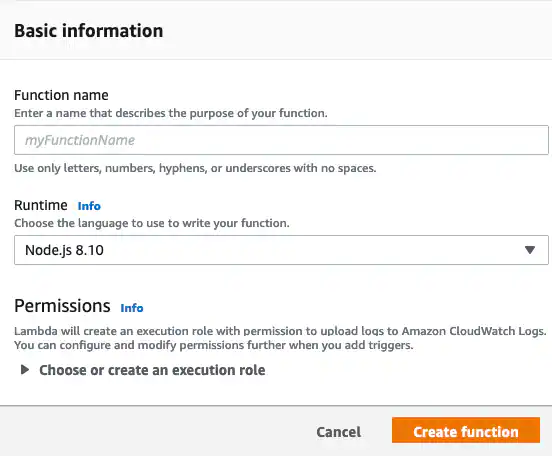
- Open the AWS Lambda page and click Create a function.
- Click Author from scratch.
-
Create a new AWS Lambda function:
- Enter a Function Name.
- In the Runtime menu, select the current version of Python.
- In the Execution Role section, you may create a new role with basic AWS Lambda permissions, use an existing role, or create a new role from AWS policy templates.
- Click Create Function.
-
Assign it to the Amazon SNS topic:
- Click Add Trigger.
- Select SNS from the list.
- Enter the Amazon Resource Name (ARN) of the Amazon SNS topic your created.
- Select Enable Trigger.
- Click Add.
-
Select the AWS Lambda function:
- Enter the following code to send the populated fields from an alarm or event in USM Anywhere:
Note: LevelBlue cannot provide a list of fields specific to Amazon SNS because the list varies depending on each data source.- Under Basic settings, set Timeout to 10 seconds.
- Click Save.