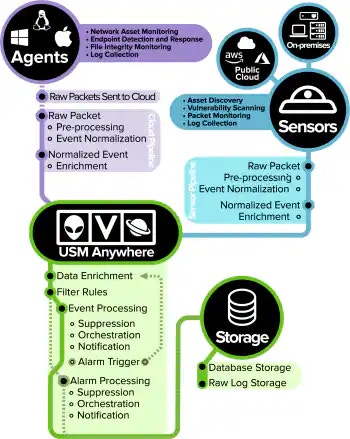
After USM Anywhere is installed in your environment, start flowing through the system, so you can start gaining visibility into the type of events that are occurring, what natural or non-threatening activity is taking place, and what activity can be a possible attack. USM Anywhere also begins collecting other information about your network and various network devices such as , routers and switches, servers, and . In addition, it is discovering and determining possible vulnerabilities and threats to your environment. The following illustration details a high level view of events and other information from your network environment as it is collected or generated by the USM Anywhere and , and then delivered to the USM Anywhere for processing and storage.Documentation Index
Fetch the complete documentation index at: https://docs.levelblue.com/llms.txt
Use this file to discover all available pages before exploring further.

Note: To protect the health of your system, USM Anywhere monitors the rate of events being sent to your sensor. If that rate, measured in events per second (EPS), threatens to impact your sensor’s capacity your EPS will be throttled. Throttling allows your system to take more time to process events coming in, without risking event loss. USM Anywhere will generate an event when EPS throttling is engaged.See Protecting Your Sensor’s Performance with EPS Throttling for more details about when EPS is engaged and how it works, and Understanding Your Data Consumption Status to learn more about sensor capacity and USM Anywhere tier limits.