

- Log in to USM Anywhere and go to Settings > System.
- In the left navigation panel, click NXLog Configuration to open the page.
-
Select Linux Systems.
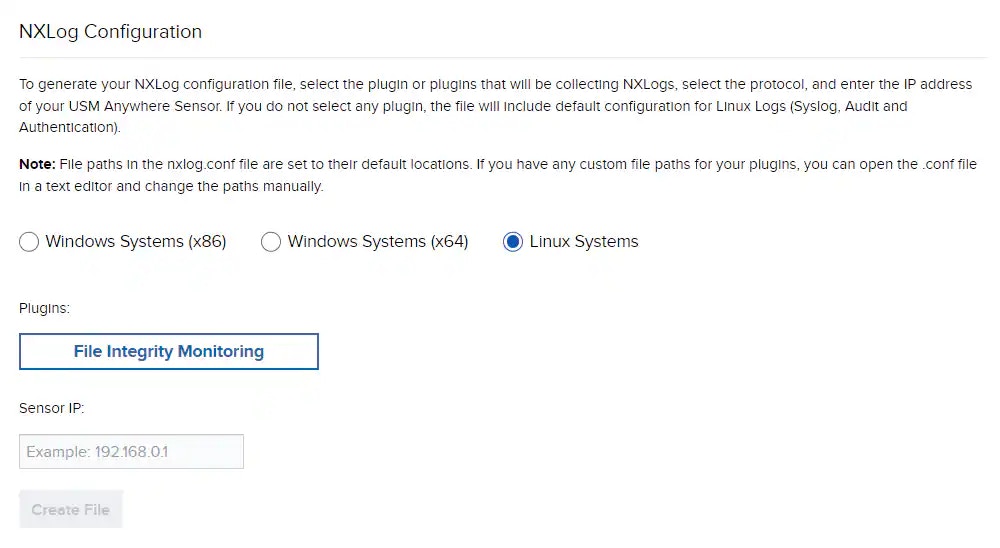
- Click File Integrity Monitoring.
-
Enter the IP address of your USM Anywhere Sensor.
Note: USM Anywhere uses UDP port 514 to forward the logs.
-
Click Create File to generate the new nxlog.conf file and save it to your NXLog installation directory.
Note: LevelBlue recommends you to save a copy of the original nxlog.conf file first.
- Restart NXLog. The BlueApp for Linux NXLog is auto-discovered. No additional configuration is needed. Following is an example of the downloaded file:
Collecting Linux System Logs
Linux Log Collection with NXLog
NXLog is a universal log collection and forwarding agent for various platforms, including Linux. With the NXLog Enterprise Edition, you can scan files and directories to report detected change, known as file integrity monitoring (FIM). USM Anywhere provides an BlueApp for Linux NXLog and the configuration file to collect FIM data.
According to the vendor documentation, FIM is only available in the NXLog Enterprise Edition. In addition, NXLog must have permission to read the files you want to monitor. You can run NXLog as root, or make sure the nxlog user or group has permission to read the files.
To download the configuration file from USM Anywhere