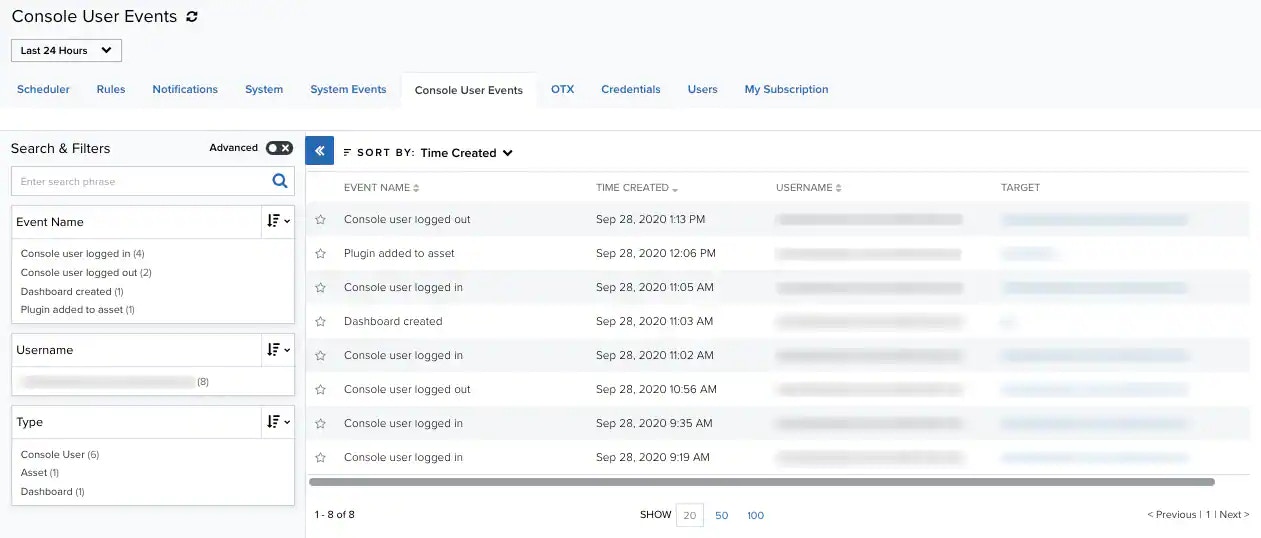
Role Availability | ✔️ Read-Only ✔️ Investigator ✔️ Analyst ✔️ Manager USM Anywhere provides a centralized view of your console user events. Go to Settings > Console User Events. The console user events page displays information on any actions generated within your environment by the user. On the left you can find the search and filters options. At the top of the page, you can see any filters you have applied. The main part of the page is the actual list of console user events. Each row describes an individual console user event. If you want to analyze the data, you can maximize the screen and hide the filter pane. Click theDocumentation Index
Fetch the complete documentation index at: https://docs.levelblue.com/llms.txt
Use this file to discover all available pages before exploring further.
Console User Events are retained for 12 months.
| Column Field Name | Description |
|---|---|
| Event Name | Name of the event. |
| Time Created | The date and time of the creation of the event. The displayed date depends on your computer’s time zone. |
| Username | Email account associated with the person who triggered the event. |
| Target | Identification of the modified object. |
Note: You can view your bookmarked items by going to the secondary menu and clicking the
icon. This will display all of your bookmarked items and provide direct links to each of them.