

-
From the alarms list view, click the
 icon.
The Manage Columns dialog box opens.
icon.
The Manage Columns dialog box opens.
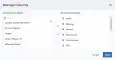
- Search the columns you want to have in the list view by using the search field.
-
Use the
 and
and  icons to select or deselect from the available columns.
- You can order the columns by clicking and dragging the column to the desired place.
- Click Apply.
If you generate a report when you have set custom columns, your report keeps the columns you have configured.