Role Availability | ✔️ Read-Only ✔️ Analyst ✔️ ManagerIn USM Central, all alarms have a Priority field, which indicates the importance of the alarm. This is a measurement to determine the impact of the alarm in the network.The Priority field can display Low, Medium, or High. This text comes from correlation and orchestration rules. When you create an orchestration rule, you must enter a priority value between 0 and 100. LevelBlue Labs™ creates the correlation rules and include a value. The LevelBlue Labs team sets the value for the correlation rules depending on how critical the alarm is.The displayed text in the column of alarms depends on the value that the rule has according to this table:Priority Field for Alarms
Displayed text
Value in the rule
Low
Between 0 and 33
Medium
Between 34 and 66
High
Between 67 and 100
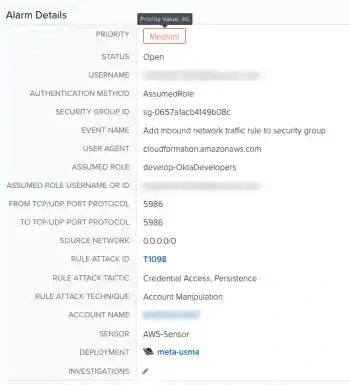
Open the details of an alarm to learn the exact value of the priority level. See View Alarm Details for more information. After you are in the Alarm Details page, hover over the priority text and a dialog box will show you the exact value.