

- Go to Environment > Vulnerabilities.
- Search for the vulnerability where you want to see the available remediation patches. See Searching Vulnerabilities for more information.
- Click the vulnerability to open a dialog box with the vulnerability.
- Click the vulnerability title to open the full details of the vulnerability.
-
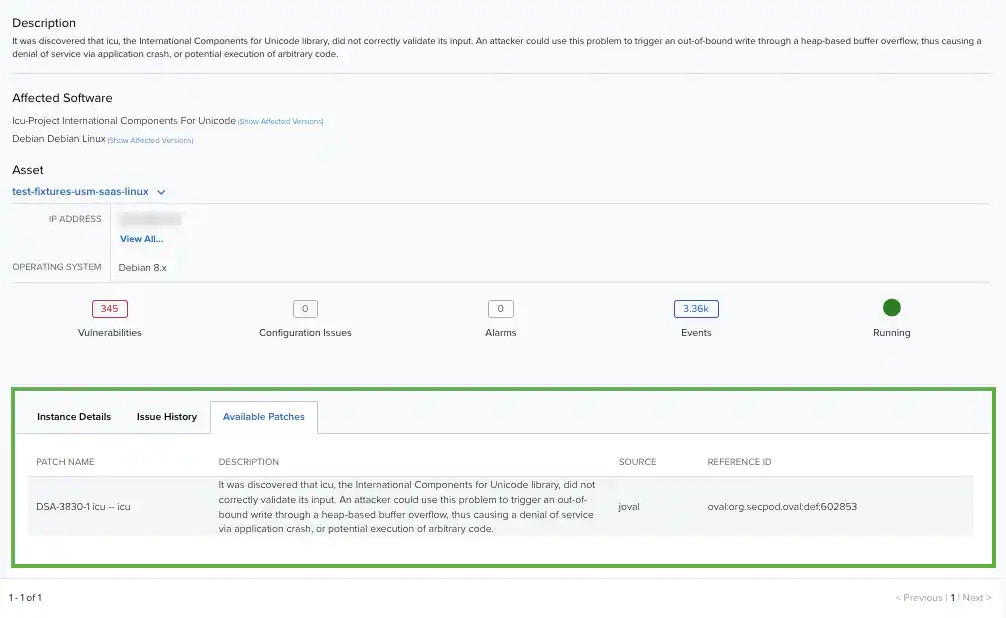
Click the Available Patches tab.
Asset Management
Available Remediation Patches for Vulnerabilities
USM Anywhere enables you to display the available remediation patches for a vulnerability. In case of an existing remediation patch for a vulnerability, USM Anywhere displays the patch name, a description, the source, and the reference identification (ID).
To display the available remediation patches on a vulnerability